Event Hooks
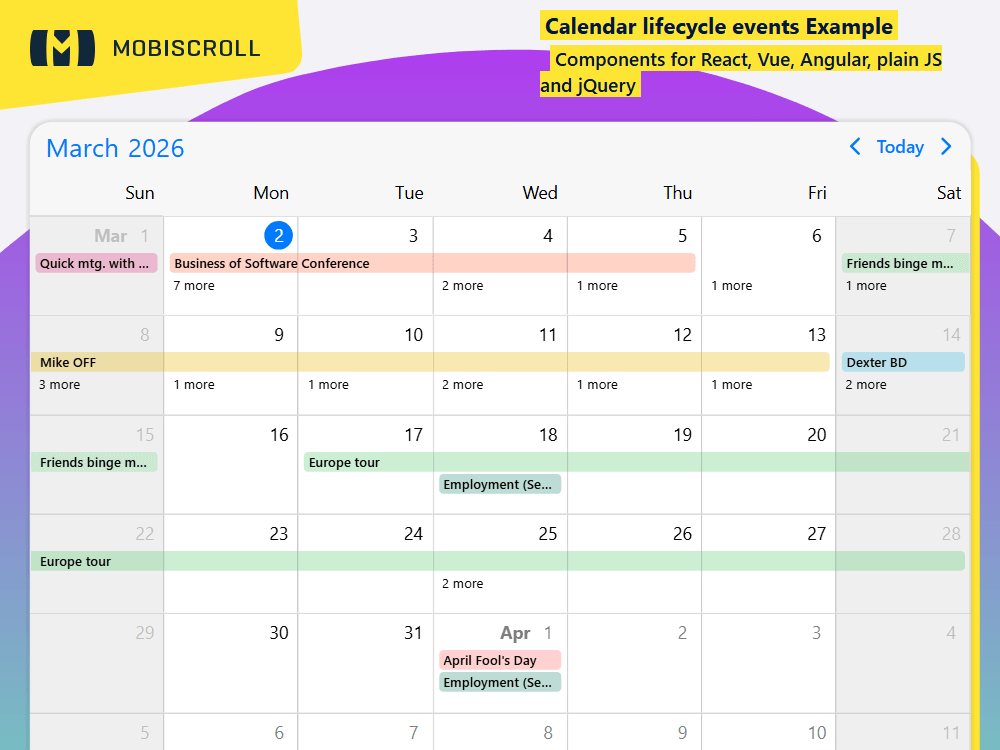
The event calendar ships with different hooks for deep customization. Events are triggered through the lifecycle of the component where you can tie in custom functionality and code.
While users interact with the UI events like onEventClick, onInit, onSelectedDateChange ... will be triggered.
For a complete list of events go to the documentation See available lifecycle events →
Demo
onCellClick: function (event, inst) { /* Logic for handling cell clicks */ },
onCellDoubleClick: function (event, inst) { /* Logic for handling cell double clicks */ },
onCellRightClick: function (event, inst) { /* Logic for handling cell right clicks */ },
onCellHoverIn: function (event, inst) { /* Logic for handling cell hover in */ },
onCellHoverOut: function (event, inst) { /* Logic for handling cell hover out */ },
onDestroy: function (event, inst) { /* Logic for destroying the event calendar */ },
onEventClick: function (event, inst) { /* Logic for event click */ },
onEventCreate: function (event, inst) { /* Logic for event create */ },
onEventCreated: function (event, inst) { /* Logic for event created */ },
onEventCreateFailed: function (event, inst) { /* Logic for failed event create */ },
onEventDelete: function (event, inst) { /* Logic for event delete */ },
onEventDeleted: function (event, inst) { /* Logic for event deleted */ },
onEventDoubleClick: function (event, inst) { /* Logic for event double click */ },
onEventDragEnd: function (event, inst) { /* Triggered when event drag ends */ },
onEventDragStart: function (event, inst) { /* Triggered when event drag is started */ },
onEventDragEnter: function (event, inst) { /* Triggered when a dragged event enters the calendar */ }
onEventDragLeave: function (event, inst) { /* Triggered when a dragged event leaves the calendar */ }
onEventHoverIn: function (event, inst) { /* Logic for event hover in */ },
onEventHoverOut: function (event, inst) { /* Logic for event hover out */ },
onEventRightClick: function (event, inst) { /* Logic for event right click */ },
onEventUpdate: function (event, inst) { /* Logic for event update */ },
onEventUpdated: function (event, inst) { /* This is where you save the updated event to your DB */ },
onEventUpdateFailed: function (event, inst) { /* Logic for failed event update */ },
onInit: function (event, inst) { /* Logic running on component init */ },
onLabelClick: function (event, inst) { /* Logic for label click */ },
onPageChange: function (event, inst) { /* Your custom event handler goes here */ },
onPageLoaded: function (event, inst) { /* Use it to inject custom markup & attach custom listeners */ },
onPageLoading: function (event, inst) { /* Use it to load data on demand */ },
onSelectedDateChange: function (event, inst) { /* Use it to keep track of the selected date externally */ }
Event log
External drag 1
Drag me to calendar
External drag 2
Drag me to calendar
JSHTMLCSS
mobiscroll.setOptions({
  locale:  ,
  theme: ' ',
  themeVariant: ' '
});

var inst = mobiscroll.eventcalendar('#demo', {
  dragToCreate: true,
  dragToMove: true,
  dragToResize: true,
  externalDrop: true,
  invalid: [
    {
      recurring: {
        repeat: 'weekly',
        weekDays: 'SA,SU',
      },
    },
  ],
  view: {
    calendar: { labels: true },
  },
  onCellClick: function () {
    // Logic for handling cell clicks
  },
  onCellDoubleClick: function () {
    /* Logic for handling cell double clicks */
  },
  onCellRightClick: function () {
    /* Logic for handling cell right clicks */
  },
  onCellHoverIn: function () {
    /* Logic for handling cell hover in */
  },
  onCellHoverOut: function () {
    /* Logic for handling cell hover out */
  },
  onDestroy: function () {
    // Logic for destroying the event calendar
  },
  onEventClick: function () {
    // Logic for event click
  },
  onEventCreate: function () {
    // Logic for event create
  },
  onEventCreated: function () {
    // Logic for event created
  },
  onEventCreateFailed: function () {
    // Logic for failed event create
  },
  onEventDelete: function () {
    // Logic for event delete
  },
  onEventDeleted: function () {
    // Logic for event deleted
  },
  onEventDoubleClick: function () {
    // Logic for event double click
  },
  onEventDragStart: function () {
    // Logic for event drag start
  },
  onEventDragEnd: function () {
    // Logic for event drag end
  },
  onEventDragEnter: function () {
    // Logic for event drag enter
  },
  onEventDragLeave: function () {
    // Logic for event drag leave
  },
  onEventHoverIn: function () {
    // Logic for event hover in
  },
  onEventHoverOut: function () {
    // Logic for event hover out
  },
  onEventUpdate: function () {
    // Logic for event update
  },
  onEventUpdated: function () {
    // Logic for event updated
  },
  onEventUpdateFailed: function () {
    // Logic for failed event update
  },
  onEventRightClick: function () {
    // Logic for event right click
  },
  onInit: function () {
    // Logic running on component init
  },
  onLabelClick: function () {
    // Logic for label click
  },
  onPageChange: function () {
    // Your custom event handler goes here
  },
  onPageLoaded: function () {
    // Use it to inject custom markup & attach custom listeners
  },
  onPageLoading: function () {
    // Use it to load data on demand
  },
  onSelectedDateChange: function () {
    // Use it to keep track of the selected date externally
  },
});

mobiscroll.getJson(
  'https://trial.mobiscroll.com/events/?vers=5',
  function (events) {
    inst.setEvents(events);
  },
  'jsonp',
);
<div mbsc-draggable data-drag-data='{"title": "External drag 1", "color": "#ffdab8"}' class="event-hooks-draggable" style="background: #ffdab8;">
    <div class="draggable-title">External drag 1</div>
    <div class="draggable-text">Drag me to calendar</div>
</div>
<div mbsc-draggable data-drag-data='{"title": "External drag 2", "color": "#ddfcf7"}' class="event-hooks-draggable" style="background: #ddfcf7;">
    <div class="draggable-title">External drag 2</div>
    <div class="draggable-text">Drag me to calendar</div>
</div>
<div id="demo"></div>
.event-hooks-draggable {
    padding: 10px 20px;
    display: inline-block;
    margin: 15px;
    border-radius: 8px;
    width: 210px;
}

.event-hooks-draggable .draggable-title {
    font-size: 16px;
    font-weight: 600;
}

.event-hooks-draggable .draggable-text {
    opacity: 0.7;
    line-height: 25px;
}

.event-hooks-draggable-1 {
    background: #ffdab8;
}

.event-hooks-draggable-2 {
    background: #ddfcf7;
}