Drag & drop
Calendar events can be created, moved and resized on the Eventcalendar. Furthermore it is possible to drag and drop events from an external source or to drag and drop to an external target from the Eventcalendar. The following sections describe how these solutions can be implemented and used.
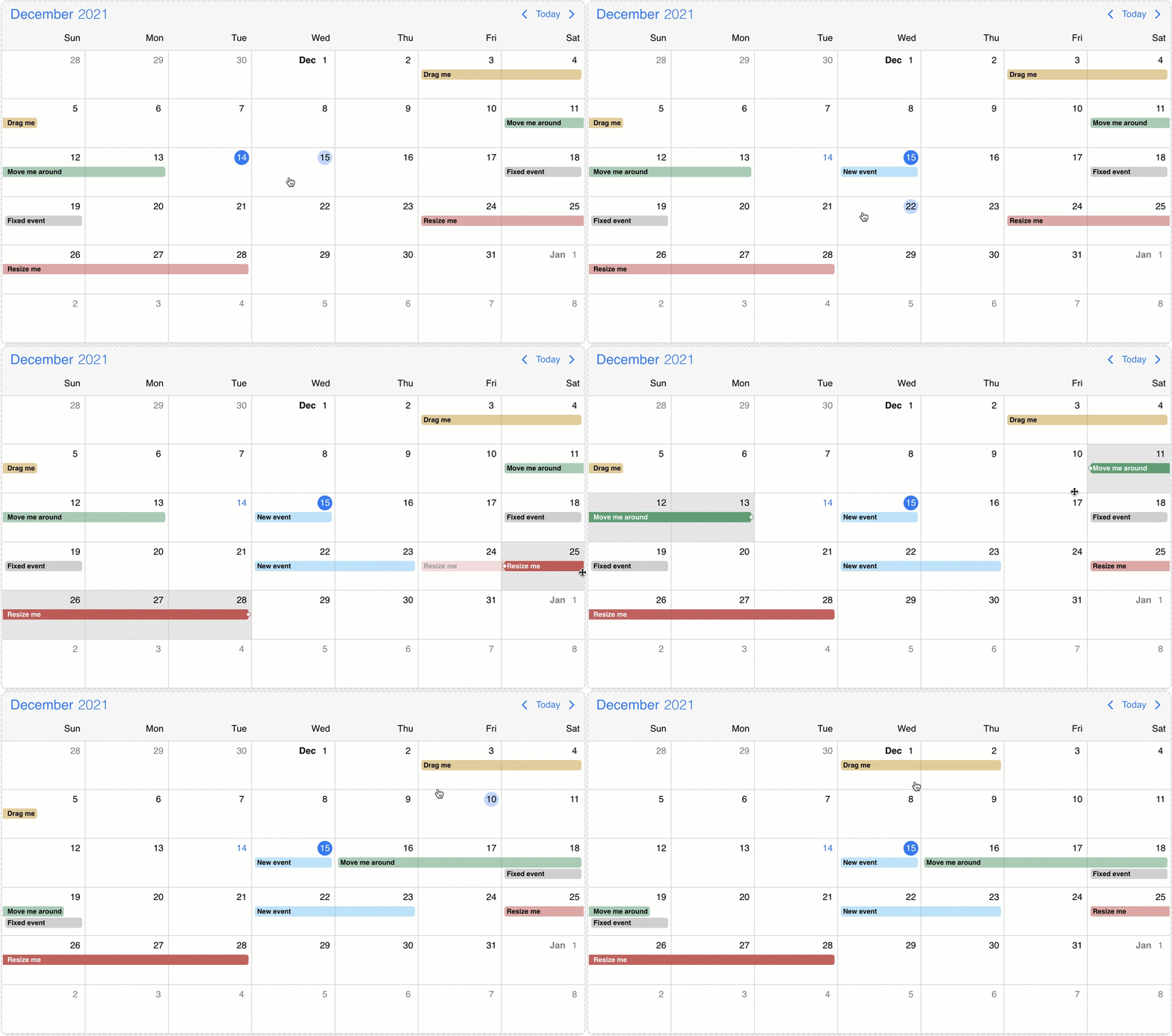
Internal drag/resize/create
The events on the Eventcalendar can be moved and resized with mouse/touch interactions. The dragToMove and dragToResize options enable the events drag and drop and resize functionality. With the dragTimeStep option the minimum amount of drag/resize step can be specified in minutes.
With the dragToCreate option enabled, events can be created by dragging on the empty areas of the Eventcalendar. On a desktop environment a new event can also be created with the clickToCreate option.
To customize the newly created event use the extendDefaultEvent option.
Targeting the Eventcalendar
There is a possibility to drag & drop any external element into your calendar.
In order to achieve this, first you need to grant permission to your calendar to accept this behavior. You can do that by setting the externalDrop option to true.
As a second step, you'll have to create your external draggable element and pass a skeleton event definition through the dragData option which will be added to the Eventcalendar on drop. If omitted, a default event will be created.
You can initialize the draggable containers by using the draggable() function on the container element.
<div id="myDraggableCont">
  <div>My Draggable event</div>
</div>

<div id="myDiv"></div>
mobiscroll.draggable('#myDraggableCont', {
  dragData: {
    title: "My new 3h long event",
    start: new Date(2023, 10, 10, 12),
    end: new Date(2023, 10, 10, 15),
    color: "green",
  }
});

mobiscroll.eventcalendar('#myDiv', {
  externalDrop: true,
});
The Eventcalendar as source
The externalDrag option enables events to be dragged out from the calendar/schedule/timeline views and dropped on another instance of the Eventcalendar or any Dropcontainer.
When an event leaves the Eventcalendar the onEventDragLeave life-cycle event will be fired and a clone of the calendar event will be displayed for a better illustration of the movement. If the dragToMove option is not enabled the dragged event will instantly leave the calendar container and the onEventDragLeave event will fire and the event clone will be displayed. When an event enters the Eventcalendar the onEventDragEnter life-cycle event will be fired.
Dropcontainer
The Dropcontainer defines a container where events can be dragged from or dropped to. The onItemDragLeave and onItemDragEnter life-cycle events can be used to track when an event exits or enters the Dropcontainer. When an item is dropped inside the container the onItemDrop event is triggered. This can be useful for unscheduling work or appointments that were already scheduled.
<div id="myDropcontainer">
  <div>Unscheduled events:</div>
  <div id="myList">
    <div id="myDrag122" mbsc-draggable data-drag-data='{"id": "122", "title": "My new 3h long event"}'>
      <div>My new 3h long event</div>
    </div>
  </div>
</div>

<div id="myDiv"></div>
mobiscroll.dropcontainer('#myDropcontainer', {
  onItemDrop: function(dropEvent) {
    if (dropEvent.data) {
      const ev = dropEvent.data;
      const el = `<div id="myDrag${ev.id}"><div>${ev.title}</div></div>`;
      document.getElementById('myList').insertAdjacentHTML('beforeend', el);
      mobiscroll.draggable('#myDrag' + ev.id, {
        dragData: ev
      });
    }
  }
});

mobiscroll.eventcalendar('#myDiv', {
  externalDrop: true,
  externalDrag: true,
  dragToCreate: true,
  dragToMove: true,
  onEventCreate: function (args) {
    const ev = args.event;
    document.getElementById('myDrag' + ev.id).remove();
  }
});
Dropcontainer events
onDestroy
(args: any, inst: any) => void
Triggered when the component is destroyed.
Parameters:
args - The event argument object.
inst - The component instance.
onInit
(args: any, inst: any) => void
Triggered when the component is initialized.
Parameters:
args - The event argument object.
inst - The component instance.
onItemDragEnter
(args: MbscItemDragEvent) => void
Triggered when an event is dragged into the calendar/timeline/schedule view.
Parameters:
- args - The event argument with the following properties:
domEvent: Event - The DOM event of the drag.data: MbscCalendarEvent - The dragged calendar event.
onItemDragLeave
(args: MbscItemDragEvent) => void
Triggered when an event is dragged into the calendar/timeline/schedule view.
Parameters:
- args - The event argument with the following properties:
domEvent: Event - The DOM event of the drag.data: MbscCalendarEvent - The dragged calendar event.
onItemDrop
(args: MbscItemDragEvent) => void
Triggered when an event is dropped inside the drop container.
Parameters:
- args - The event argument with the following properties:
domEvent: Event - The DOM event of the drag.data: MbscCalendarEvent - The dragged calendar event.
