Overview
Welcome to the Mobiscroll Connect API documentation. See Getting Started for what Mobiscroll Connect is and its key capabilities — this section covers the REST endpoints, authentication flow, and response formats you'll use to work with Google Calendar, Microsoft Outlook, Apple Calendar, and CalDAV through a unified interface.
Authentication
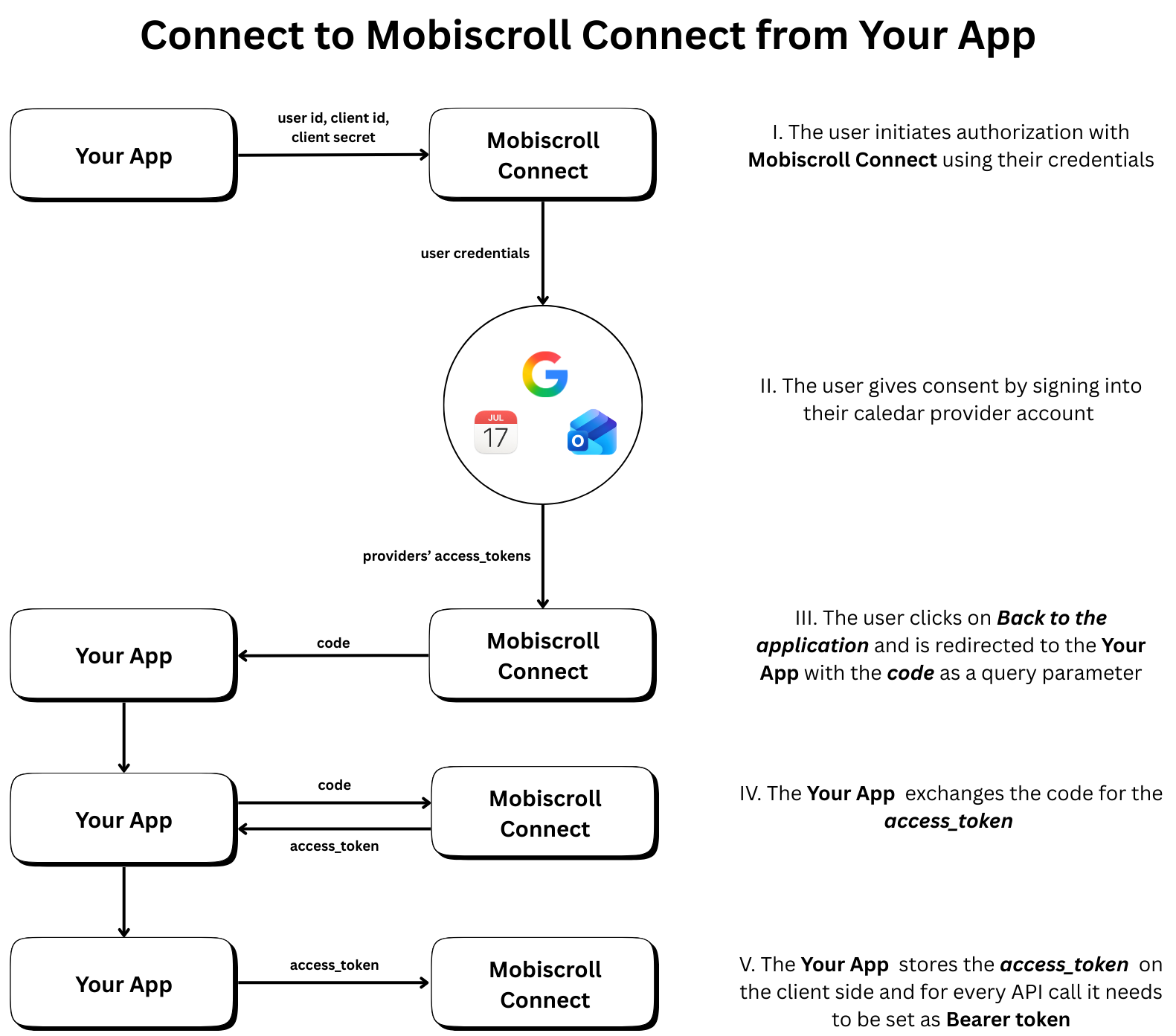
Most API endpoints require authentication using a Bearer token (JWT). Include the token in the Authorization header:
Authorization: Bearer YOUR_JWT_TOKEN
Exception: The OAuth authorization endpoint does not require authentication as it initiates the OAuth flow.
To obtain an access token:
- Direct users to the GET /authorize endpoint to initiate the OAuth2 flow
- Users will authenticate with their calendar provider(s)
- After successful authentication, they'll be redirected to your
redirect_uriwith an authorization code - Exchange the authorization code for an access token using POST /token
- Use the access token in the
Authorizationheader for all subsequent API requests
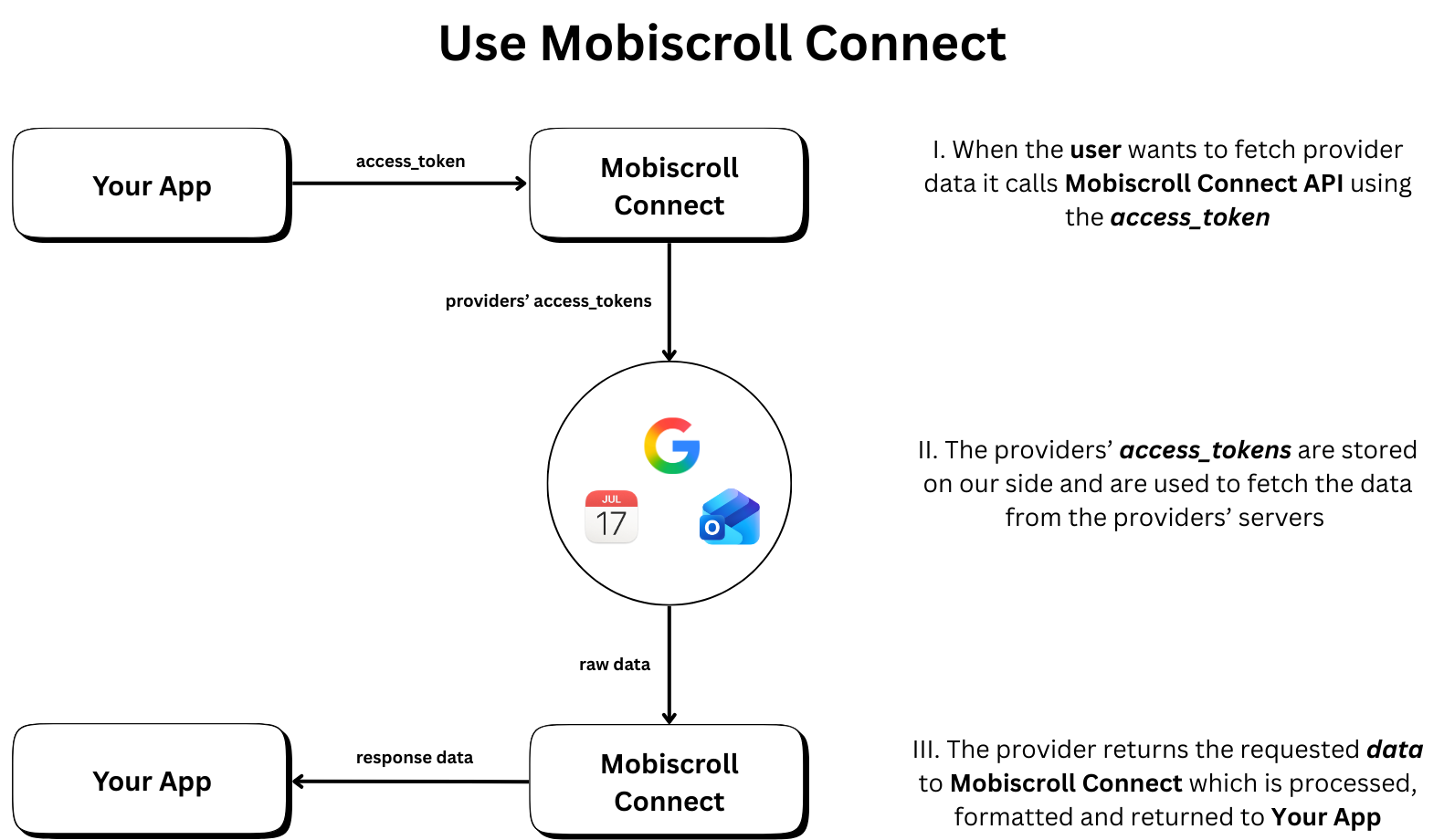
Available Endpoints
OAuth API
Initiate and complete the OAuth2 authorization flow to connect user calendar accounts.
- GET /authorize - Initiate OAuth2 authorization flow
- POST /token - Exchange authorization code for access token
- POST /token - Refresh access token using a refresh token
- POST /revoke - Revoke all active tokens for a user
Events API
Retrieve, create, update, and delete calendar events from connected providers with support for pagination, filtering, and recurring events.
- GET /events - Fetch calendar events with advanced filtering and pagination
- POST /event - Create a new calendar event
- PUT /event - Update an existing calendar event
- DELETE /event - Delete a calendar event
Calendars API
Manage calendar lists across all connected providers.
- GET /calendars - Retrieve all calendars from connected providers
Webhooks API
Subscribe calendars and receive normalized event change notifications from Google, Microsoft, Apple, and CalDAV (polling-based for Apple and CalDAV).
- POST /subscribe-webhook - Create a webhook subscription for a calendar
- POST /unsubscribe-webhook - Remove an existing webhook subscription
- GET https://connect.mobiscroll.com/.well-known/webhook-keys - Fetch the public keys that verify delivery signatures (served from the domain root, not under
/api)
Supported Providers
Mobiscroll Connect supports the following calendar providers:
- Google Calendar (
'google') - Microsoft Outlook (
'microsoft') - Apple Calendar (
'apple') - CalDAV (
'caldav')
Base URL
All API requests should be made to:
https://connect.mobiscroll.com/api
Response Format
All API responses are returned in JSON format. Successful responses include the requested data, while error responses include an error field with a descriptive message.
Error Handling
Standard HTTP status codes are used to indicate the success or failure of requests:
- 200 - Success
- 202 - Accepted (async operations)
- 400 - Bad Request (invalid parameters)
- 401 - Unauthorized (invalid or missing token)
- 404 - Not Found (resource doesn't exist)
- 500 - Internal Server Error (unexpected failure)
