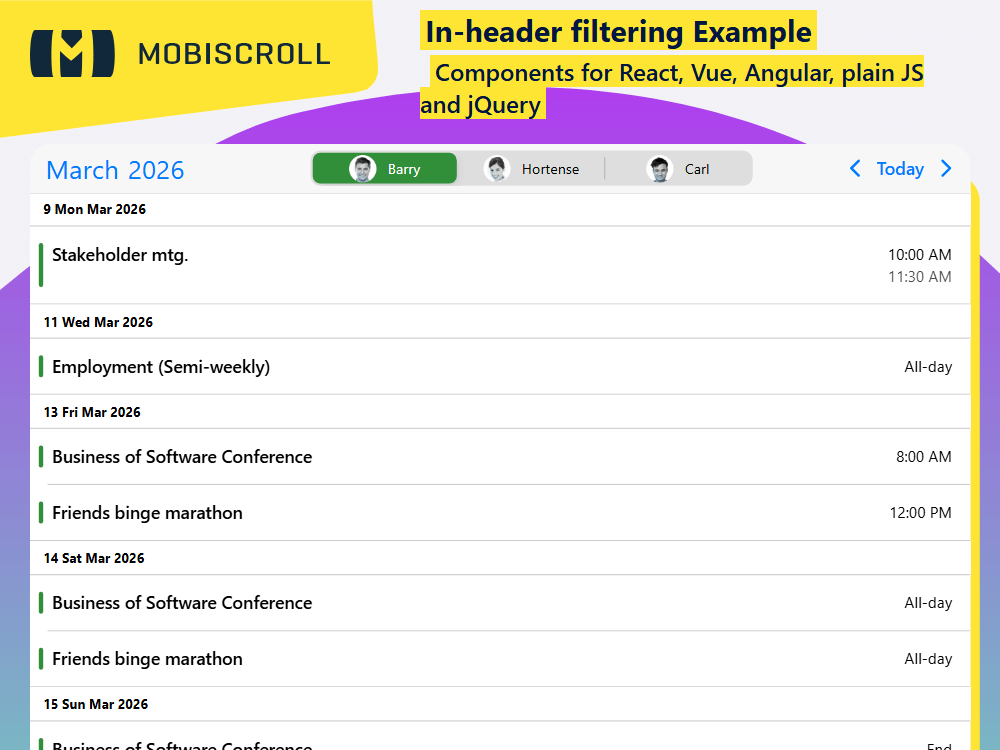
Resource Filter in Header

The agenda doesn't have built in resource listing, however we can easily solve that inside the header using the segmented component. The header of the agenda is a canvas and an opportunity for customization. You can add custom components and enable new interaction in context.

Such an example would be a custom filter block created with the help of a segmented control and placed between the standard UI components, which are:

  • Navigation component - <CalendarNav />. Use the .md-header-filter-controls CSS class for custom overrides.
  • Today button - <CalendarToday />. Use the .md-header-filter-today CSS class for custom overrides.
  • Previous month button - <CalendarPrev />. Use the .md-header-filter-prev CSS class for custom overrides.
  • Next month button - <CalendarNext />. Use the .md-header-filter-next CSS class for custom overrides.

For changing the order the controls are laid out, you only need to set up the renderHeader.

Overriding the order for specific themes

For a custom order on a theme to theme basis, you will need to use a little CSS. Flex layout makes reordering easy. It's just a matter of setting the order in CSS. For material use the .mbsc-material, for windows the .mbsc-windows prefix and for iOS it is .mbsc-ios class. Eg.:

.mbsc-material .mds-header-filter-prev { order: 1; }
            .mbsc-material .mds-header-filter-next { order: 2; }
            .mbsc-material .mds-header-filter { order: 3; }
            .mbsc-material .mds-header-filter-today { order: 4; }
Want to style and reorder the header?  Take a look at the previous example →
Get started with this example

Demo

Loading the live demo

Preview in full screen

Embed a segmented resource filter in the Agenda custom header — filter displayed events by person or team.

Code

import {
  CalendarNav,
  CalendarNext,
  CalendarPrev,
  CalendarToday,
  Eventcalendar,
  getJson,
  Segmented,
  SegmentedGroup,
  setOptions,
  Toast ,
} from '@mobiscroll/react';
import { useCallback, useEffect, useMemo, useState } from 'react';

setOptions({
  locale:  ,
  theme: ' ',
  themeVariant: ' '
});

function App() {
  const [filteredEvents, setFilteredEvents] = useState([]);
  const [myEvents, setEvents] = useState([]);
  const [selectedResources, setSelectedResources] = useState({ 1: true });
  const [isToastOpen, setToastOpen] = useState(false);
  const [toastMessage, setToastMessage] = useState();

  const myView = useMemo(() => ({ agenda: { type: 'month' } }), []);

  const myResources = useMemo(
    () => [
      { id: 1, name: 'Barry', color: '#328e39', img: 'https://img.mobiscroll.com/demos/m1.png' },
      { id: 2, name: 'Hortense', color: '#00aabb', img: 'https://img.mobiscroll.com/demos/f1.png' },
      { id: 3, name: 'Carl', color: '#ea72c0', img: 'https://img.mobiscroll.com/demos/m2.png' },
    ],
    [],
  );

  const handleToastClose = useCallback(() => {
    setToastOpen(false);
  }, []);

  const handleChange = useCallback(
    (ev) => {
      const value = +ev.target.value;
      const checked = ev.target.checked;
      const resource = myResources.find((r) => r.id === value);

      const updatedSelectedResources = { ...selectedResources, [value]: checked };
      setSelectedResources(updatedSelectedResources);
      setFilteredEvents(myEvents.filter((e) => updatedSelectedResources[e.resource]));
      setToastMessage((checked ? 'Showing ' : 'Hiding ') + (resource ? resource.name : '') + ' events');
      setToastOpen(true);
    },
    [myEvents, myResources, selectedResources],
  );

  const customHeader = useCallback(
    () => (
      <>
        <CalendarNav className="mds-header-filter-nav" />
        <div className="mds-header-filter mbsc-flex-1-0">
          <SegmentedGroup select="multiple">
            {myResources.map((res) => (
              <Segmented
                key={res.id}
                value={res.id}
                checked={selectedResources[res.id]}
                className={'mds-header-filter-' + res.id}
                onChange={handleChange}
              >
                <img className="mds-header-filter-img" src={res.img} alt={res.name} />
                <span className="mds-header-filter-name">{res.name}</span>
              </Segmented>
            ))}
          </SegmentedGroup>
        </div>
        <CalendarPrev className="mds-header-filter-prev" />
        <CalendarToday className="mds-header-filter-today" />
        <CalendarNext className="mds-header-filter-next" />
      </>
    ),
    [handleChange, myResources, selectedResources],
  );

  useEffect(() => {
    getJson(
      'https://trial.mobiscroll.com/filter-resource-events/',
      (events) => {
        setEvents(events);
        setFilteredEvents(events.filter((e) => e.resource === 1));
      },
      'jsonp',
    );
  }, []);

  return (
    <>
      <Eventcalendar data={filteredEvents} renderHeader={customHeader} resources={myResources} view={myView} />
      <Toast message={toastMessage} isOpen={isToastOpen} onClose={handleToastClose} />
    </>
  );
}

export default App;

Duplicate Session

You have signed in on a different machine. To keep everything in sync, you have been signed out of this session.

If you need to invite team members, manage seats and accounts you can do it from the licenses page.

Duplicate Session

We noticed you are logged in on a different machine and have closed your old session.

If you need to invite team members, manage seats and accounts you can do it from the licenses page.