Multi-Calendar Support
The agenda supports multiple calendar systems. You can control it with the calendarSystem setting, and it supports the following options:
- Gregorian - it is included by default
- Jalali - it is the default system of the Persian calendar and is included within the Farsi language pack
- Hijri - it is included in the Arabic language pack
Interested in localization? Explore this example →
Demo
Pick a calendar system
<script setup>
import { 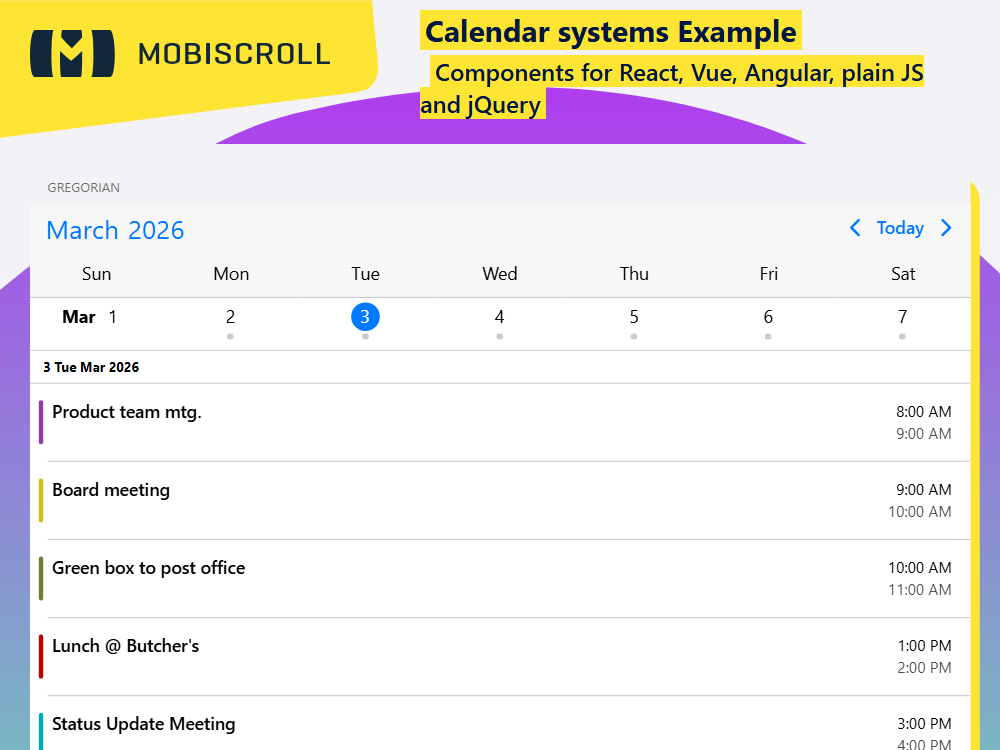
SFC JSSFC TS
<script setup>
import {
  getJson,
  hijriCalendar,
  jalaliCalendar,
  localeAr,
  localeFa,
  MbscEventcalendar,
  MbscPage,
  setOptions
} from '@mobiscroll/vue'
import { onMounted, ref } from 'vue'

setOptions({
  theme: ' ',
  themeVariant: ' '
})

const myEvents = ref([])

const myView = {
  calendar: { type: 'week' },
  agenda: { type: 'day' }
}

onMounted(() => {
  getJson(
    'https://trial.mobiscroll.com/events/?vers=5',
    (events) => {
      myEvents.value = events
    },
    'jsonp'
  )
})
</script>

<template>
  <MbscPage>
    <div class="mbsc-grid">
      <div class="mbsc-row">
        <div class="mbsc-col-sm-12 mbsc-col-md-4">
          <div class="mbsc-form-group">
            <div class="mbsc-form-group-title">Gregorian calendar</div>
            <MbscEventcalendar :data="myEvents" :view="myView" />
          </div>
        </div>
        <div class="mbsc-col-sm-12 mbsc-col-md-4">
          <div class="mbsc-form-group">
            <div class="mbsc-form-group-title">Jalali calendar</div>
            <MbscEventcalendar
              :data="myEvents"
              :calendarSystem="jalaliCalendar"
              :locale="localeFa"
              :view="myView"
            />
          </div>
        </div>
        <div class="mbsc-col-sm-12 mbsc-col-md-4">
          <div class="mbsc-form-group">
            <div class="mbsc-form-group-title">Hijri calendar</div>
            <MbscEventcalendar
              :data="myEvents"
              :calendarSystem="hijriCalendar"
              :locale="localeAr"
              :view="myView"
            />
          </div>
        </div>
      </div>
    </div>
  </MbscPage>
</template>
<script setup lang="ts">
import {
  getJson,
  hijriCalendar,
  jalaliCalendar,
  localeAr,
  localeFa,
  MbscEventcalendar,
  MbscPage,
  setOptions
} from '@mobiscroll/vue'
import type { MbscCalendarEvent, MbscEventcalendarView } from '@mobiscroll/vue'
import { onMounted, ref } from 'vue'

setOptions({
  theme: ' ',
  themeVariant: ' '
})

const myEvents = ref<MbscCalendarEvent[]>([])

const myView: MbscEventcalendarView = {
  calendar: { type: 'week' },
  agenda: { type: 'day' }
}

onMounted(() => {
  getJson(
    'https://trial.mobiscroll.com/events/?vers=5',
    (events: MbscCalendarEvent[]) => {
      myEvents.value = events
    },
    'jsonp'
  )
})
</script>

<template>
  <MbscPage>
    <div class="mbsc-grid">
      <div class="mbsc-row">
        <div class="mbsc-col-sm-12 mbsc-col-md-4">
          <div class="mbsc-form-group">
            <div class="mbsc-form-group-title">Gregorian calendar</div>
            <MbscEventcalendar :data="myEvents" :view="myView" />
          </div>
        </div>
        <div class="mbsc-col-sm-12 mbsc-col-md-4">
          <div class="mbsc-form-group">
            <div class="mbsc-form-group-title">Jalali calendar</div>
            <MbscEventcalendar
              :data="myEvents"
              :calendarSystem="jalaliCalendar"
              :locale="localeFa"
              :view="myView"
            />
          </div>
        </div>
        <div class="mbsc-col-sm-12 mbsc-col-md-4">
          <div class="mbsc-form-group">
            <div class="mbsc-form-group-title">Hijri calendar</div>
            <MbscEventcalendar
              :data="myEvents"
              :calendarSystem="hijriCalendar"
              :locale="localeAr"
              :view="myView"
            />
          </div>
        </div>
      </div>
    </div>
  </MbscPage>
</template>