Event Appearance & Time Buffers
Usage
theme: 'ios' You can turn auto theming on and let it decide based on the platform.
Usage
themeVariant: 'light' You can turn auto dark mode on based on system settings.
Usage
  clickToCreate: true,
// click to create is on   dragToCreate: true,
// drag to create is on   dragToMove: true,
// reordering is on   dragToResize: true,
// resizing is on   eventDelete: true
// deleting is on
Fine-tune drag & drop with these options, which are false by default.
Usage
locale: mobiscroll.localeEn Selecting the locale loads the localized settings and the translated UI text.
Event Appearance & Time Buffers
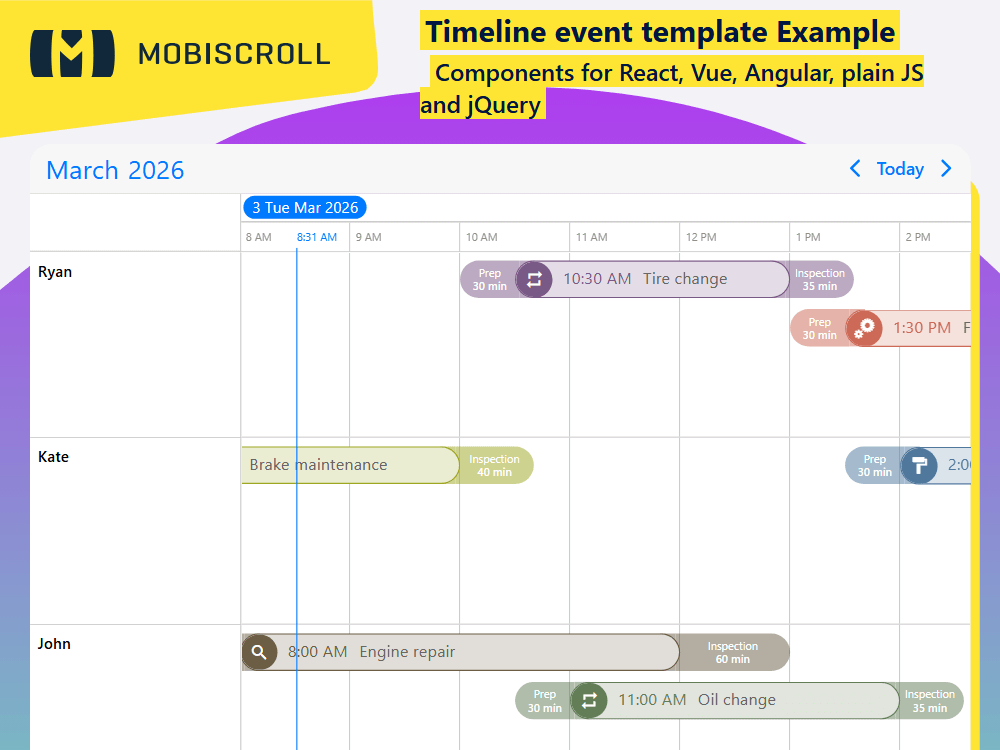
Events can be customized through the renderTimelineEvent option. How the events look are fully up to you. Base event fields along with custom fields can be accessed when writing the rendering function.
The before/after buffers can help you visualise delays or added minutes for tasks. For example travel time for meetings/appointments, check in/check out for flights.
The buffers can be customized through the renderBufferBefore and renderBufferAfter options.
Demo
Code
mobiscroll.setOptions({
  locale:  ,
  theme: ' ',
  themeVariant: ' '
});

mobiscroll.eventcalendar('#demo-timeline-template', {
  clickToCreate:  ,
  dragToCreate:  ,
  dragToMove:  ,
  dragToResize:  ,
  eventDelete:  ,
  view: {
    timeline: {
      type: 'day',
    },
  },
  renderTimelineEvent: function (data) {
    var ev = data.original;
    var color = data.color;

    return (
      '<div class="md-timeline-template-event" style="border-color:' +
      color +
      ';background:' +
      color +
      '">' +
      '<div class="md-timeline-template-event-cont">' +
      '<span class="mbsc-icon mbsc-font-icon mbsc-icon-' +
      ev.taskType +
      '" style="background:' +
      color +
      '"></span>' +
      '<span class="md-timeline-template-time" style="color:' +
      color +
      ';">' +
      data.start +
      '</span>' +
      '<span class="md-timeline-template-title">' +
      ev.title +
      '</span></div></div>'
    );
  },
  renderBufferBefore: function (args) {
    var event = args.original;
    var color = event.color;

    return (
      '<div class="md-buffer md-before-buffer" style="background: ' +
      color +
      '">Prep' +
      '<span class="md-buffer-time">' +
      event.bufferBefore +
      ' min</span>' +
      '<div class="md-buffer-tail" style="background: ' +
      color +
      '"></div></div>'
    );
  },
  renderBufferAfter: function (args) {
    var event = args.original;
    var color = event.color;

    return (
      '<div class="md-buffer md-after-buffer" style="background: ' +
      color +
      '">Inspection' +
      '<span class="md-buffer-time">' +
      event.bufferAfter +
      ' min</span>' +
      '<div class="md-buffer-tail" style="background: ' +
      color +
      '"></div></div>'
    );
  },
  extendDefaultEvent: function () {
    return {
      taskType: 'cogs',
      bufferAfter: 60,
      bufferBefore: 30,
      color: '#239a21',
    };
  },
  data: [
    {
      bufferBefore: 30,
      bufferAfter: 35,
      start: '2026-10-22T10:30',
      end: '2026-10-22T13:00',
      title: 'Tire change',
      color: '#7a5886',
      taskType: 'material-repeat',
      resource: 1,
    },
    {
      bufferAfter: 40,
      bufferBefore: 30,
      start: '2026-10-22T07:00',
      end: '2026-10-22T10:00',
      title: 'Brake maintenance',
      color: '#9da721',
      taskType: 'cogs',
      resource: 2,
    },
    {
      bufferAfter: 45,
      bufferBefore: 30,
      start: '2026-10-22T13:30',
      end: '2026-10-22T16:30',
      title: 'Fluid maintenance',
      color: '#cd6957',
      taskType: 'cogs',
      resource: 1,
    },
    {
      bufferAfter: 35,
      bufferBefore: 30,
      start: '2026-10-22T11:00',
      end: '2026-10-22T14:00',
      title: 'Oil change',
      color: '#637e57',
      taskType: 'material-repeat',
      resource: 3,
    },
    {
      bufferAfter: 60,
      bufferBefore: 30,
      start: '2026-10-22T08:00',
      end: '2026-10-22T12:00',
      title: 'Engine repair',
      color: '#6c5d45',
      taskType: 'material-search',
      resource: 3,
    },
    {
      bufferAfter: 45,
      bufferBefore: 30,
      start: '2026-10-22T14:00',
      end: '2026-10-22T19:00',
      title: 'Car painting',
      color: '#50789d',
      taskType: 'material-format-paint',
      resource: 2,
    },
  ],
  resources: [
    {
      id: 1,
      name: 'Ryan',
      color: '#239a21',
    },
    {
      id: 2,
      name: 'Kate',
      color: '#01adff',
    },
    {
      id: 3,
      name: 'John',
      color: '#ff0101',
    },
  ],
});
<div class="md-timeline-template">
    <div id="demo-timeline-template"></div>
</div>
.md-timeline-template .mbsc-schedule-event.mbsc-ltr {
  height: auto !important;
}

.md-timeline-template-event {
  border: 1px solid transparent;
  margin: 2px 0;
}

.md-timeline-template-event-cont {
  background: rgba(255, 255, 255, .8);
  font-size: 15px;
  height: 32px;
  white-space: nowrap;
  text-overflow: ellipsis;
  overflow: hidden;
}

.md-timeline-template-event-cont .mbsc-icon {
  padding: 5px;
  box-sizing: content-box;
}

.md-before-buffer,
.mbsc-timeline-event-start .md-timeline-template-event,
.mbsc-timeline-event-start .md-timeline-template-event-cont,
.mbsc-timeline-event-start .md-timeline-template-event-cont .mbsc-icon {
  border-top-left-radius: 20px;
  border-bottom-left-radius: 20px;
}

.md-after-buffer,
.mbsc-timeline-event-end .md-timeline-template-event,
.mbsc-timeline-event-end .md-timeline-template-event-cont,
.mbsc-timeline-event-end .md-timeline-template-event-cont .mbsc-icon {
  border-top-right-radius: 20px;
  border-bottom-right-radius: 20px;
}

.md-buffer {
  position: absolute;
  display: flex;
  width: 100%;
  font-size: 10px;
  top: 2px;
  bottom: 2px;
  left: 0;
  color: #fff;
  padding: 0 6px;
  line-height: 12px;
  flex-direction: column;
  align-items: center;
  justify-content: center;
  text-align: center;
  opacity: .5;
  box-sizing: border-box;
  z-index: -1;
}

.md-buffer-tail {
  position: absolute;
  width: 14px;
  height: 100%;
  top: 0;
}

.md-before-buffer .md-buffer-tail {
  left: 100%;
}

.md-after-buffer .md-buffer-tail {
  right: 100%;
}

.md-buffer-time {
  font-weight: 600;
}

.md-timeline-template-event-cont .mbsc-icon:before {
  color: #fff;
  font-size: 18px;
}

.md-timeline-template-time {
    margin: 0 10px;
}

.md-timeline-template-title {
  color: #666;
}

.md-timeline-template .mbsc-timeline-column,
.md-timeline-template .mbsc-timeline-header-column {
  min-width: 100px;
}

.md-timeline-template .mbsc-timeline-resource,
.md-timeline-template .mbsc-timeline-row {
  min-height: 100px;
}