Search Events in Sidebar
Usage
theme: 'ios' You can turn auto theming on and let it decide based on the platform.
Usage
themeVariant: 'light' You can turn auto dark mode on based on system settings.
Usage
  clickToCreate: true,
// click to create is on   dragToCreate: true,
// drag to create is on   dragToMove: true,
// reordering is on   dragToResize: true,
// resizing is on   eventDelete: true
// deleting is on
Fine-tune drag & drop with these options, which are false by default.
Usage
locale: localeEn Selecting the locale loads the localized settings and the translated UI text.
Search Events in Sidebar
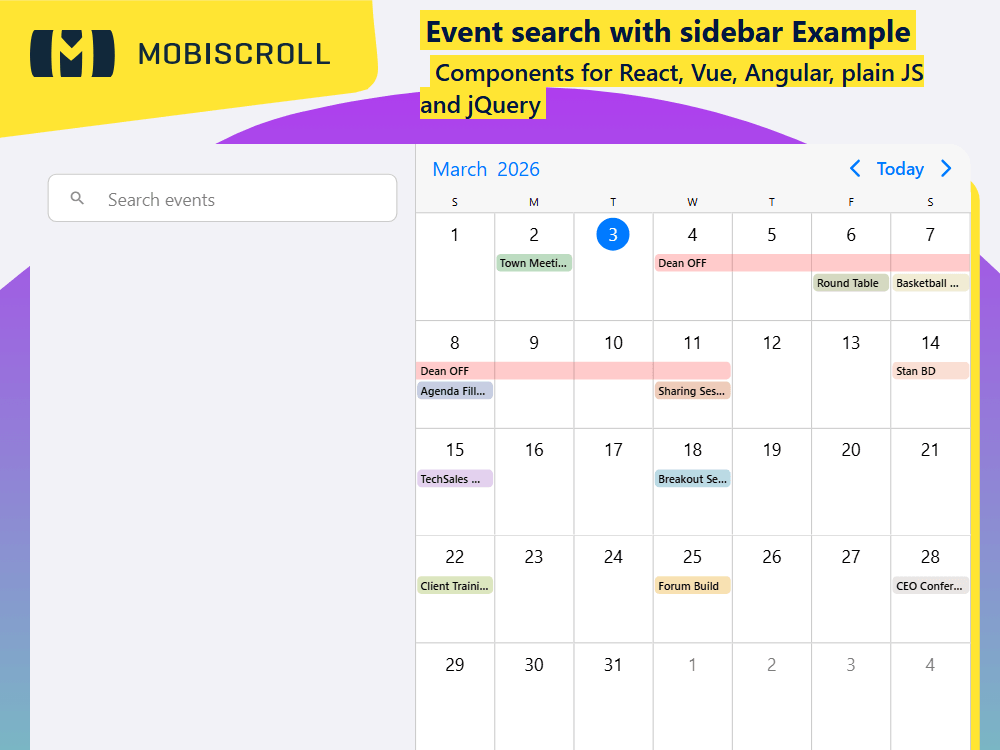
Inline search can be easily implemented with the help of a separate agenda instance. This example is relying on a single API endpoint for getting the data onto the primary calendar view and also for getting the filtered data based on the search terms.
Events can be filtered in real time so using an agenda view for the search results is an easy choice. It provides all the necessary styling and advanced features that you might need to customize the experience.
Alternatively, search can be implemented in the header of the event calendar using a similar search box with an agenda listed in a popup instead of rendered inline.
Demo
Code
View code on GitHub
<script setup>
import {
  formatDate,
  getJson,
  MbscEventcalendar,
  MbscInput,
  MbscPage,
  setOptions
} from '@mobiscroll/vue'
import { ref } from 'vue'

setOptions({
  locale:  ,
  theme: ' ',
  themeVariant: ' '
})

const calEvents = ref([])
const listEvents = ref([])
const selectedEvent = ref([])
const displayResults = ref(false)

const calInst = ref(null)
const timer = ref(null)

const calView = { calendar: { labels: true } }
const listView = { agenda: { type: 'year', size: 5 } }

function handleInputChange(ev) {
  const searchText = ev.target.value

  clearTimeout(timer.value)
  timer.value = setTimeout(() => {
    if (searchText.length > 0) {
      getJson(
        'https://trial.mobiscroll.com/searchevents/?text=' + searchText,
        (data) => {
          listEvents.value = data
          displayResults.value = true
        },
        'jsonp'
      )
    } else {
      displayResults.value = false
    }
  }, 200)
}

function handlePageLoading(args) {
  const start = formatDate('YYYY-MM-DD', args.viewStart)
  const end = formatDate('YYYY-MM-DD', args.viewEnd)

  setTimeout(() => {
    getJson(
      'https://trial.mobiscroll.com/searchevents/?start=' + start + '&end=' + end,
      (data) => {
        calEvents.value = data
      },
      'jsonp'
    )
  })
}

function handleEventClick(args) {
  selectedEvent.value = [args.event]
  calInst.value.instance.navigateToEvent(args.event)
}
</script>

<template>
  <MbscPage cssClass="mds-full-height">
    <div class="mds-full-height mbsc-flex">
      <div class="mds-search-sidebar mbsc-flex-col mbsc-flex-none">
        <MbscInput
          autocomplete="off"
          startIcon="material-search"
          inputStyle="outline"
          placeholder="Search events"
          @input="handleInputChange"
        />
        <MbscEventcalendar
          v-if="displayResults"
          :data="listEvents"
          :showControls="false"
          :view="listView"
          @event-click="handleEventClick"
        />
      </div>
      <div class="mds-search-calendar mbsc-flex-1-1">
        <MbscEventcalendar
          ref="calInst"
          :clickToCreate="false"
          :data="calEvents"
          :dragToCreate="false"
          :dragToMove="false"
          :dragToResize="false"
          :selectMultipleEvents="true"
          :selectedEvents="selectedEvent"
          :view="calView"
          @page-loading="handlePageLoading"
        />
      </div>
    </div>
  </MbscPage>
</template>

<style>
.mds-full-height {
  height: 100%;
}

.mds-search-calendar {
  border-left: 1px solid #ccc;
  overflow: hidden;
}

.mds-search-sidebar {
  width: 350px;
}

.mds-search-sidebar .mbsc-textfield-wrapper.mbsc-ios {
  margin-top: 27px;
  margin-bottom: 26px;
}

.mds-search-sidebar .mbsc-textfield-wrapper.mbsc-material {
  margin-top: 26px;
  margin-bottom: 26px;
}

.mds-search-sidebar .mbsc-textfield-wrapper.mbsc-windows {
  margin-top: 35px;
  margin-bottom: 35px;
}

@media (min-width: 1135px) {
  .mds-search-sidebar .mbsc-textfield-wrapper.mbsc-windows {
    margin-top: 40px;
    margin-bottom: 40px;
  }
}
</style>
<script setup lang="ts">
import {
formatDate,
getJson,
MbscEventcalendar,
MbscInput,
MbscPage,
setOptions
} from '@mobiscroll/vue'
import type {
MbscCalendarEvent,
MbscEventcalendarView,
MbscEventClickEvent,
MbscPageLoadingEvent
} from '@mobiscroll/vue'
import { ref } from 'vue'
setOptions({
locale: ,
theme: ' ',
themeVariant: ' '
})
const calEvents = ref<MbscCalendarEvent[]>([])
const listEvents = ref<MbscCalendarEvent[]>([])
const selectedEvent = ref<MbscCalendarEvent[]>([])
const displayResults = ref(false)
const calInst = ref<typeof MbscEventcalendar>()
const timer = ref<ReturnType<typeof setTimeout>>()
const calView: MbscEventcalendarView = { calendar: { labels: true } }
const listView: MbscEventcalendarView = { agenda: { type: 'year', size: 5 } }
function handleInputChange(ev: Event) {
const input = ev.target as HTMLInputElement
const searchText = input.value
clearTimeout(timer.value)
timer.value = setTimeout(() => {
if (searchText.length > 0) {
getJson(
'https://trial.mobiscroll.com/searchevents/?text=' + searchText,
(data: MbscCalendarEvent[]) => {
listEvents.value = data
displayResults.value = true
},
'jsonp'
)
} else {
displayResults.value = false
}
}, 200)
}
function handlePageLoading(args: MbscPageLoadingEvent) {
const start = formatDate('YYYY-MM-DD', args.viewStart)
const end = formatDate('YYYY-MM-DD', args.viewEnd)
setTimeout(() => {
getJson(
'https://trial.mobiscroll.com/searchevents/?start=' + start + '&end=' + end,
(data: MbscCalendarEvent[]) => {
calEvents.value = data
},
'jsonp'
)
})
}
function handleEventClick(args: MbscEventClickEvent) {
selectedEvent.value = [args.event]
calInst.value?.instance.navigateToEvent(args.event)
}
</script>
<template>
<MbscPage cssClass="mds-full-height">
<div class="mds-full-height mbsc-flex">
<div class="mds-search-sidebar mbsc-flex-col mbsc-flex-none">
<MbscInput
autocomplete="off"
startIcon="material-search"
inputStyle="outline"
placeholder="Search events"
@input="handleInputChange"
/>
<MbscEventcalendar
v-if="displayResults"
:data="listEvents"
:showControls="false"
:view="listView"
@event-click="handleEventClick"
/>
</div>
<div class="mds-search-calendar mbsc-flex-1-1">
<MbscEventcalendar
ref="calInst"
:clickToCreate="false"
:data="calEvents"
:dragToCreate="false"
:dragToMove="false"
:dragToResize="false"
:selectMultipleEvents="true"
:selectedEvents="selectedEvent"
:view="calView"
@page-loading="handlePageLoading"
/>
</div>
</div>
</MbscPage>
</template>
<style>
.mds-full-height {
height: 100%;
}
.mds-search-calendar {
border-left: 1px solid #ccc;
overflow: hidden;
}
.mds-search-sidebar {
width: 350px;
}
.mds-search-sidebar .mbsc-textfield-wrapper.mbsc-ios {
margin-top: 27px;
margin-bottom: 26px;
}
.mds-search-sidebar .mbsc-textfield-wrapper.mbsc-material {
margin-top: 26px;
margin-bottom: 26px;
}
.mds-search-sidebar .mbsc-textfield-wrapper.mbsc-windows {
margin-top: 35px;
margin-bottom: 35px;
}
@media (min-width: 1135px) {
.mds-search-sidebar .mbsc-textfield-wrapper.mbsc-windows {
margin-top: 40px;
margin-bottom: 40px;
}
}
</style>