Instance Event Transfer
Usage
theme="ios" You can turn auto theming on and let it decide based on the platform.
Usage
themeVariant="light" You can turn auto dark mode on based on system settings.
Usage
  clickToCreate={true}
// click to create is on   dragToCreate={true}
// drag to create is on   dragToMove={true}
// reordering is on   dragToResize={true}
// resizing is on   eventDelete={true}
// deleting is on
Fine-tune drag & drop with these options, which are false by default.
Usage
locale={localeEn} Selecting the locale loads the localized settings and the translated UI text.
Instance Event Transfer
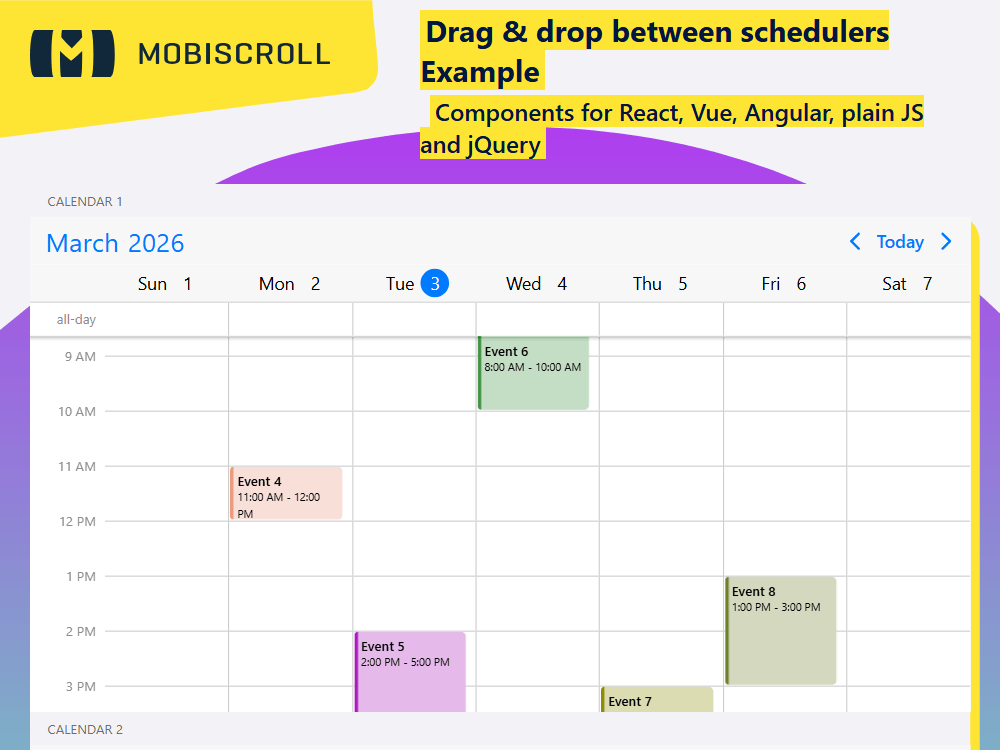
There are certain cases when moving the events between calendars can come in handy.
Dragging and dropping events between two scheduler instances can be enabled by turning on the externalDrag and externalDrop options.
Demo
Loading the live demo
The live demo didn't load.
Try it on demo.mobiscroll.comCalendar 1
Calendar 2
Code
View code on GitHub
import { Eventcalendar, setOptions, Toast  } from '@mobiscroll/react';
import { useCallback, useMemo, useState } from 'react';

setOptions({
  locale:  ,
  theme: ' ',
  themeVariant: ' '
});

function App() {
  const [isToastOpen, setToastOpen] = useState(false);
  const [toastText, setToastText] = useState();
  const [toastContext, setToastContext] = useState();

  const myView = useMemo(
    () => ({
      scheduler: {
        type: 'week',
      },
    }),
    [],
  );

  const firstEvents = useMemo(
    () => [
      {
        start: '2026-10-17T10:00',
        end: '2026-10-17T14:00',
        title: 'Event 1',
        color: '#de3d83',
      },
      {
        start: '2026-10-18T07:00',
        end: '2026-10-18T08:00',
        title: 'Event 2',
        color: '#6e7f29',
      },
      {
        start: '2026-10-19T16:00',
        end: '2026-10-19T18:00',
        title: 'Event 3',
        color: '#e7b300',
      },
      {
        start: '2026-10-21T11:00',
        end: '2026-10-21T12:00',
        title: 'Event 4',
        color: '#e9967a',
      },
      {
        start: '2026-10-22T14:00',
        end: '2026-10-22T17:00',
        title: 'Event 5',
        color: '#a917bb',
      },
      {
        start: '2026-10-23T08:00',
        end: '2026-10-23T10:00',
        title: 'Event 6',
        color: '#3d9140',
      },
      {
        start: '2026-10-24T15:00',
        end: '2026-10-24T16:00',
        title: 'Event 7',
        color: '#8b8b00',
      },
      {
        start: '2026-10-25T13:00',
        end: '2026-10-25T15:00',
        title: 'Event 8',
        color: '#6e7f29',
      },
      {
        start: '2026-10-27T10:00',
        end: '2026-10-27T12:00',
        title: 'Event 9',
        color: '#37bbe4',
      },
      {
        start: '2026-10-28T16:00',
        end: '2026-10-28T17:00',
        title: 'Event 10',
        color: '#ee9572',
      },
      {
        start: '2026-10-30T11:00',
        end: '2026-10-30T14:00',
        title: 'Event 11',
        color: '#c67171',
      },
      {
        start: '2026-11-01T07:00',
        end: '2026-11-01T09:00',
        title: 'Event 12',
        color: '#8b1a1a',
      },
    ],
    [],
  );

  const secondEvents = useMemo(
    () => [
      {
        start: '2026-10-17T14:00',
        end: '2026-10-17T17:00',
        title: 'Event 1',
        color: '#e7b300',
      },
      {
        start: '2026-10-18T10:00',
        end: '2026-10-18T12:00',
        title: 'Event 2',
        color: '#6e7f29',
      },
      {
        start: '2026-10-19T08:00',
        end: '2026-10-19T09:00',
        title: 'Event 3',
        color: '#37bbe4',
      },
      {
        start: '2026-10-21T15:00',
        end: '2026-10-21T17:00',
        title: 'Event 4',
        color: '#8b1a1a',
      },
      {
        start: '2026-10-22T12:00',
        end: '2026-10-22T13:00',
        title: 'Event 5',
        color: '#c67171',
      },
      {
        start: '2026-10-23T17:00',
        end: '2026-10-23T20:00',
        title: 'Event 6',
        color: '#6e7f29',
      },
      {
        start: '2026-10-24T14:00',
        end: '2026-10-24T16:00',
        title: 'Event 7',
        color: '#a917bb',
      },
      {
        start: '2026-10-25T10:00',
        end: '2026-10-25T13:00',
        title: 'Event 8',
        color: '#7ac5cd',
      },
      {
        start: '2026-10-27T15:00',
        end: '2026-10-27T16:00',
        title: 'Event 9',
        color: '#de3d83',
      },
      {
        start: '2026-10-28T11:00',
        end: '2026-10-28T12:00',
        title: 'Event 10',
        color: '#3d9140',
      },
      {
        start: '2026-10-30T08:00',
        end: '2026-10-30T10:00',
        title: 'Event 11',
        color: '#8b8b00',
      },
      {
        start: '2026-11-01T17:00',
        end: '2026-11-01T19:00',
        title: 'Event 12',
        color: '#ee9572',
      },
    ],
    [],
  );

  const handleCloseToast = useCallback(() => {
    setToastOpen(false);
  }, []);

  const handleFirstCalEventCreated = useCallback((args) => {
    if (args.action === 'externalDrop') {
      setToastText('Event dropped to Calendar 1');
      setToastContext('.md-drag-drop-first-calendar');
      setToastOpen(true);
    }
  }, []);

  const handleSecondCalEventCreated = useCallback((args) => {
    if (args.action === 'externalDrop') {
      setToastText('Event dropped to Calendar 2');
      setToastContext('.md-drag-drop-second-calendar');
      setToastOpen(true);
    }
  }, []);

  return (
    <div className="md-drag-drop-calendar">
      <div className="mbsc-form-group-title">Calendar 1</div>
      <Eventcalendar
        view={myView}
        data={firstEvents}
        height={450}
        dragToMove={true}
        eventDelete={true}
        externalDrag={true}
        externalDrop={true}
        onEventCreated={handleFirstCalEventCreated}
        className="md-drag-drop-first-calendar"
      />

      <div className="mbsc-form-group-title">Calendar 2</div>
      <Eventcalendar
        view={myView}
        data={secondEvents}
        height={450}
        dragToMove={true}
        eventDelete={true}
        externalDrag={true}
        externalDrop={true}
        onEventCreated={handleSecondCalEventCreated}
        className="md-drag-drop-second-calendar"
      />
      <Toast message={toastText} context={toastContext} isOpen={isToastOpen} onClose={handleCloseToast} />
    </div>
  );
}

export default App;
import {
  Eventcalendar,
  MbscCalendarEvent,
  MbscEventcalendarView,
  MbscEventCreatedEvent,
  setOptions,
  Toast ,
} from '@mobiscroll/react';
import { FC, useCallback, useMemo, useState } from 'react';

setOptions({
  locale:  ,
  theme: ' ',
  themeVariant: ' '
});

const App: FC = () => {
  const [isToastOpen, setToastOpen] = useState(false);
  const [toastText, setToastText] = useState<string>();
  const [toastContext, setToastContext] = useState<string>();

  const myView = useMemo<MbscEventcalendarView>(
    () => ({
      scheduler: {
        type: 'week',
      },
    }),
    [],
  );

  const firstEvents = useMemo<MbscCalendarEvent[]>(
    () => [
      {
        start: '2026-10-17T10:00',
        end: '2026-10-17T14:00',
        title: 'Event 1',
        color: '#de3d83',
      },
      {
        start: '2026-10-18T07:00',
        end: '2026-10-18T08:00',
        title: 'Event 2',
        color: '#6e7f29',
      },
      {
        start: '2026-10-19T16:00',
        end: '2026-10-19T18:00',
        title: 'Event 3',
        color: '#e7b300',
      },
      {
        start: '2026-10-21T11:00',
        end: '2026-10-21T12:00',
        title: 'Event 4',
        color: '#e9967a',
      },
      {
        start: '2026-10-22T14:00',
        end: '2026-10-22T17:00',
        title: 'Event 5',
        color: '#a917bb',
      },
      {
        start: '2026-10-23T08:00',
        end: '2026-10-23T10:00',
        title: 'Event 6',
        color: '#3d9140',
      },
      {
        start: '2026-10-24T15:00',
        end: '2026-10-24T16:00',
        title: 'Event 7',
        color: '#8b8b00',
      },
      {
        start: '2026-10-25T13:00',
        end: '2026-10-25T15:00',
        title: 'Event 8',
        color: '#6e7f29',
      },
      {
        start: '2026-10-27T10:00',
        end: '2026-10-27T12:00',
        title: 'Event 9',
        color: '#37bbe4',
      },
      {
        start: '2026-10-28T16:00',
        end: '2026-10-28T17:00',
        title: 'Event 10',
        color: '#ee9572',
      },
      {
        start: '2026-10-30T11:00',
        end: '2026-10-30T14:00',
        title: 'Event 11',
        color: '#c67171',
      },
      {
        start: '2026-11-01T07:00',
        end: '2026-11-01T09:00',
        title: 'Event 12',
        color: '#8b1a1a',
      },
    ],
    [],
  );

  const secondEvents = useMemo<MbscCalendarEvent[]>(
    () => [
      {
        start: '2026-10-17T14:00',
        end: '2026-10-17T17:00',
        title: 'Event 1',
        color: '#e7b300',
      },
      {
        start: '2026-10-18T10:00',
        end: '2026-10-18T12:00',
        title: 'Event 2',
        color: '#6e7f29',
      },
      {
        start: '2026-10-19T08:00',
        end: '2026-10-19T09:00',
        title: 'Event 3',
        color: '#37bbe4',
      },
      {
        start: '2026-10-21T15:00',
        end: '2026-10-21T17:00',
        title: 'Event 4',
        color: '#8b1a1a',
      },
      {
        start: '2026-10-22T12:00',
        end: '2026-10-22T13:00',
        title: 'Event 5',
        color: '#c67171',
      },
      {
        start: '2026-10-23T17:00',
        end: '2026-10-23T20:00',
        title: 'Event 6',
        color: '#6e7f29',
      },
      {
        start: '2026-10-24T14:00',
        end: '2026-10-24T16:00',
        title: 'Event 7',
        color: '#a917bb',
      },
      {
        start: '2026-10-25T10:00',
        end: '2026-10-25T13:00',
        title: 'Event 8',
        color: '#7ac5cd',
      },
      {
        start: '2026-10-27T15:00',
        end: '2026-10-27T16:00',
        title: 'Event 9',
        color: '#de3d83',
      },
      {
        start: '2026-10-28T11:00',
        end: '2026-10-28T12:00',
        title: 'Event 10',
        color: '#3d9140',
      },
      {
        start: '2026-10-30T08:00',
        end: '2026-10-30T10:00',
        title: 'Event 11',
        color: '#8b8b00',
      },
      {
        start: '2026-11-01T17:00',
        end: '2026-11-01T19:00',
        title: 'Event 12',
        color: '#ee9572',
      },
    ],
    [],
  );

  const handleCloseToast = useCallback(() => {
    setToastOpen(false);
  }, []);

  const handleFirstCalEventCreated = useCallback((args: MbscEventCreatedEvent) => {
    if (args.action === 'externalDrop') {
      setToastText('Event dropped to Calendar 1');
      setToastContext('.md-drag-drop-first-calendar');
      setToastOpen(true);
    }
  }, []);

  const handleSecondCalEventCreated = useCallback((args: MbscEventCreatedEvent) => {
    if (args.action === 'externalDrop') {
      setToastText('Event dropped to Calendar 2');
      setToastContext('.md-drag-drop-second-calendar');
      setToastOpen(true);
    }
  }, []);

  return (
    <div className="md-drag-drop-calendar">
      <div className="mbsc-form-group-title">Calendar 1</div>
      <Eventcalendar
        view={myView}
        data={firstEvents}
        height={450}
        dragToMove={true}
        eventDelete={true}
        externalDrag={true}
        externalDrop={true}
        onEventCreated={handleFirstCalEventCreated}
        className="md-drag-drop-first-calendar"
      />

      <div className="mbsc-form-group-title">Calendar 2</div>
      <Eventcalendar
        view={myView}
        data={secondEvents}
        height={450}
        dragToMove={true}
        eventDelete={true}
        externalDrag={true}
        externalDrop={true}
        onEventCreated={handleSecondCalEventCreated}
        className="md-drag-drop-second-calendar"
      />
      <Toast message={toastText} context={toastContext} isOpen={isToastOpen} onClose={handleCloseToast} />
    </div>
  );
};
export default App;