Event Rendering
Usage
theme="ios" You can turn auto theming on and let it decide based on the platform.
Usage
themeVariant="light" You can turn auto dark mode on based on system settings.
Usage
  clickToCreate={true}
// click to create is on   dragToCreate={true}
// drag to create is on   dragToMove={true}
// reordering is on   dragToResize={true}
// resizing is on   eventDelete={true}
// deleting is on
Fine-tune drag & drop with these options, which are false by default.
Usage
locale={localeEn} Selecting the locale loads the localized settings and the translated UI text.
Event Rendering
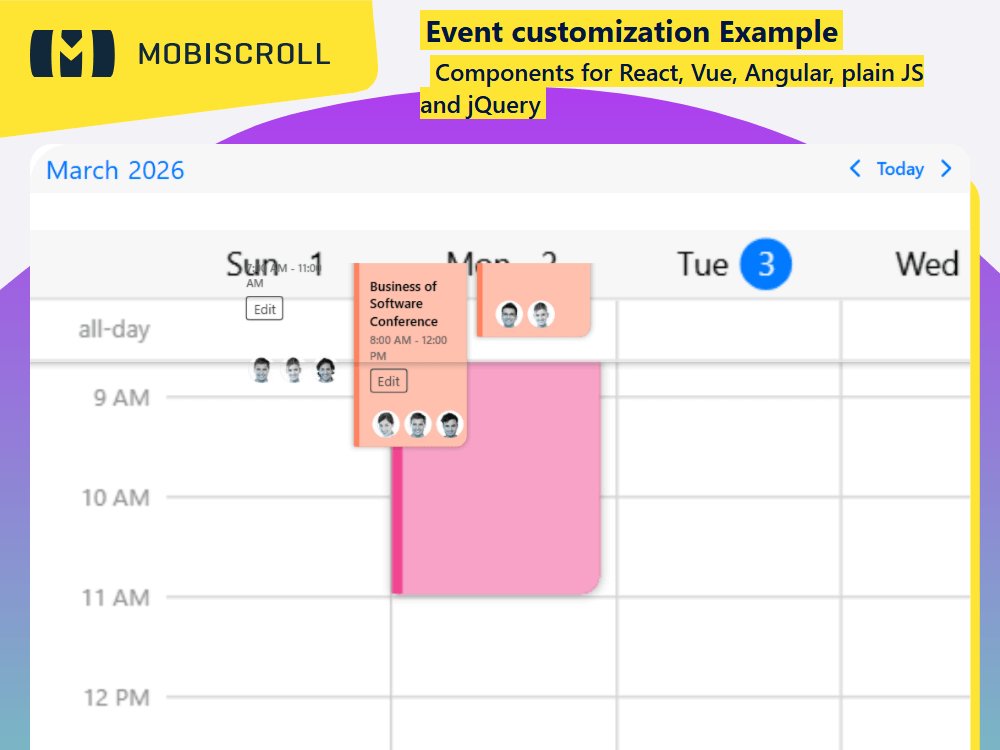
Above the built in rendering mode you can either customize the full event or just the content of the event. If we break up the event into pieces there are six fields that we are interested in:
- The event
startandendtime - Whether it is an
allDayevent or not - The event
color - The event
title bufferBeforebufferAfter
The scheduler takes care of positioning the event container and everything else is your responsibility. You will have to place and provide styling to all event fields. Beside the ones mentioned above you'll be able to render other custom fields, like description, location, participants ... and add buttons, custom interactions.
Pass a custom rendering function to the renderSchedulerEvent option. All original event fields along with computed fields like isMultiDay, lastDay can be reached inside the function.
The before/after buffers can help you visualise delays or added minutes for tasks. For example travel time for meetings/appointments, check in/check out for flights.
The buffers can be customized through the renderBufferBefore and renderBufferAfter options.
Demo
Code
View code on GitHub
import { Button, Eventcalendar, getJson, setOptions, Toast  } from '@mobiscroll/react';
import { useCallback, useEffect, useMemo, useState } from 'react';

setOptions({
  locale:  ,
  theme: ' ',
  themeVariant: ' '
});

function App() {
  const [myEvents, setEvents] = useState([]);
  const [isToastOpen, setToastOpen] = useState(false);

  const resp = useMemo(
    () => ({
      xsmall: {
        view: {
          scheduler: {
            type: 'day',
          },
        },
      },
      medium: {
        view: {
          scheduler: {
            type: 'week',
          },
        },
      },
    }),
    [],
  );

  const handleCloseToast = useCallback(() => {
    setToastOpen(false);
  }, []);

  const getCategory = useCallback((id) => {
    switch (id) {
      case 1:
        return {
          name: 'Project X',
          color: '#ff825d',
        };
      case 2:
        return {
          name: 'Stakeholder Mtg.',
          color: '#bd75d0',
        };
      case 3:
        return {
          name: 'Status Update',
          color: '#7f9230',
        };
      case 4:
        return {
          name: 'Information Sharing',
          color: '#f14590',
        };
      case 5:
        return {
          name: 'Team Building',
          color: '#64cad4',
        };
      default:
        return {
          name: '',
          color: '',
        };
    }
  }, []);

  const getParticipant = useCallback((id) => {
    switch (id) {
      case 1:
        return {
          name: 'Lisa',
          img: 'https://img.mobiscroll.com/demos/f1.png',
        };
      case 2:
        return {
          name: 'Sharon',
          img: 'https://img.mobiscroll.com/demos/f2.png',
        };
      case 3:
        return {
          name: 'Emily',
          img: 'https://img.mobiscroll.com/demos/f3.png',
        };
      case 4:
        return {
          name: 'Rose',
          img: 'https://img.mobiscroll.com/demos/f4.png',
        };
      case 5:
        return {
          name: 'Matt',
          img: 'https://img.mobiscroll.com/demos/m1.png',
        };
      case 6:
        return {
          name: 'Rick',
          img: 'https://img.mobiscroll.com/demos/m2.png',
        };
      case 7:
        return {
          name: 'John',
          img: 'https://img.mobiscroll.com/demos/m3.png',
        };
      case 8:
        return {
          name: 'Ethan',
          img: 'https://img.mobiscroll.com/demos/m4.png',
        };
      default:
        return {
          name: '',
          img: '',
        };
    }
  }, []);

  const edit = useCallback(() => {
    setToastOpen(true);
  }, []);

  const customScheduleEvent = useCallback(
    (data) => {
      const original = data.original;
      const cat = getCategory(original.category);
      if (data.allDay) {
        return (
          <div style={{ background: cat.color }} className="md-custom-event-allday-title">
            {data.title}
          </div>
        );
      } else {
        return (
          <div className="md-custom-event-cont" style={{ borderLeft: '5px solid ' + cat.color, background: cat.color }}>
            <div className="md-custom-event-wrapper">
              <div style={{ background: cat.color }} className="md-custom-event-category">
                {cat.name}
              </div>
              <div className="md-custom-event-details">
                <div className="md-custom-event-title">{data.title}</div>
                <div className="md-custom-event-time">
                  {data.start} - {data.end}
                </div>
                <Button className="md-custom-event-btn" color="dark" variant="outline" onClick={edit}>
                  Edit
                </Button>
                <div className="md-cutom-event-img-cont">
                  {original.participants.map((p) => (
                    <img key={p} className="md-custom-event-img" src={getParticipant(p).img} />
                  ))}
                </div>
              </div>
            </div>
          </div>
        );
      }
    },
    [edit, getCategory, getParticipant],
  );

  const myBeforeBuffer = useCallback(
    (args) => {
      const cat = getCategory(args.original.category);

      return (
        <div className="md-schedule-buffer md-schedule-before-buffer">
          <div
            className="md-schedule-buffer-background"
            style={{ background: `repeating-linear-gradient(-45deg,#fcfffc,#fcfffc 10px,${cat.color} 10px,${cat.color} 20px)` }}
          ></div>
          <span className="md-buffer-text">Travel time </span>
          <span className="md-buffer-time">{args.original.bufferBefore} minutes </span>
        </div>
      );
    },
    [getCategory],
  );

  useEffect(() => {
    getJson(
      'https://trial.mobiscroll.com/multi-events/',
      (events) => {
        setEvents(events);
      },
      'jsonp',
    );
  }, []);

  return (
    <div>
      <Eventcalendar
        clickToCreate={ }
        dragToCreate={ }
        dragToMove={ }
        dragToResize={ }
        eventDelete={ }
        renderSchedulerEvent={customScheduleEvent}
        renderBufferBefore={myBeforeBuffer}
        responsive={resp}
        data={myEvents}
      />
      <Toast message="Edit clicked" isOpen={isToastOpen} onClose={handleCloseToast} />
    </div>
  );
}

export default App;
import {
  Button,
  Eventcalendar,
  getJson,
  MbscCalendarEvent,
  MbscCalendarEventData,
  MbscEventcalendarOptions,
  MbscResponsiveOptions,
  setOptions,
  Toast ,
} from '@mobiscroll/react';
import { FC, useCallback, useEffect, useMemo, useState } from 'react';

setOptions({
  locale:  ,
  theme: ' ',
  themeVariant: ' '
});

const App: FC = () => {
  const [myEvents, setEvents] = useState<MbscCalendarEvent[]>([]);
  const [isToastOpen, setToastOpen] = useState<boolean>(false);

  const resp: MbscResponsiveOptions<MbscEventcalendarOptions> = useMemo(
    () => ({
      xsmall: {
        view: {
          scheduler: {
            type: 'day',
          },
        },
      },
      medium: {
        view: {
          scheduler: {
            type: 'week',
          },
        },
      },
    }),
    [],
  );

  const handleCloseToast = useCallback(() => {
    setToastOpen(false);
  }, []);

  const getCategory = useCallback((id: number) => {
    switch (id) {
      case 1:
        return {
          name: 'Project X',
          color: '#ff825d',
        };
      case 2:
        return {
          name: 'Stakeholder Mtg.',
          color: '#bd75d0',
        };
      case 3:
        return {
          name: 'Status Update',
          color: '#7f9230',
        };
      case 4:
        return {
          name: 'Information Sharing',
          color: '#f14590',
        };
      case 5:
        return {
          name: 'Team Building',
          color: '#64cad4',
        };
      default:
        return {
          name: '',
          color: '',
        };
    }
  }, []);

  const getParticipant = useCallback((id: number) => {
    switch (id) {
      case 1:
        return {
          name: 'Lisa',
          img: 'https://img.mobiscroll.com/demos/f1.png',
        };
      case 2:
        return {
          name: 'Sharon',
          img: 'https://img.mobiscroll.com/demos/f2.png',
        };
      case 3:
        return {
          name: 'Emily',
          img: 'https://img.mobiscroll.com/demos/f3.png',
        };
      case 4:
        return {
          name: 'Rose',
          img: 'https://img.mobiscroll.com/demos/f4.png',
        };
      case 5:
        return {
          name: 'Matt',
          img: 'https://img.mobiscroll.com/demos/m1.png',
        };
      case 6:
        return {
          name: 'Rick',
          img: 'https://img.mobiscroll.com/demos/m2.png',
        };
      case 7:
        return {
          name: 'John',
          img: 'https://img.mobiscroll.com/demos/m3.png',
        };
      case 8:
        return {
          name: 'Ethan',
          img: 'https://img.mobiscroll.com/demos/m4.png',
        };
      default:
        return {
          name: '',
          img: '',
        };
    }
  }, []);

  const edit = useCallback(() => {
    setToastOpen(true);
  }, []);

  const customScheduleEvent = useCallback(
    (data: MbscCalendarEventData) => {
      const original = data.original!;
      const cat = getCategory(original.category);
      if (data.allDay) {
        return (
          <div style={{ background: cat.color }} className="md-custom-event-allday-title">
            {data.title}
          </div>
        );
      } else {
        return (
          <div className="md-custom-event-cont" style={{ borderLeft: '5px solid ' + cat.color, background: cat.color }}>
            <div className="md-custom-event-wrapper">
              <div style={{ background: cat.color }} className="md-custom-event-category">
                {cat.name}
              </div>
              <div className="md-custom-event-details">
                <div className="md-custom-event-title">{data.title}</div>
                <div className="md-custom-event-time">
                  {data.start} - {data.end}
                </div>
                <Button className="md-custom-event-btn" color="dark" variant="outline" onClick={edit}>
                  Edit
                </Button>
                <div className="md-cutom-event-img-cont">
                  {original.participants.map((p: number) => (
                    <img key={p} className="md-custom-event-img" src={getParticipant(p).img} />
                  ))}
                </div>
              </div>
            </div>
          </div>
        );
      }
    },
    [edit, getCategory, getParticipant],
  );

  const myBeforeBuffer = useCallback(
    (args: MbscCalendarEventData) => {
      const cat = getCategory(args.original!.category);

      return (
        <div className="md-schedule-buffer md-schedule-before-buffer">
          <div
            className="md-schedule-buffer-background"
            style={{ background: `repeating-linear-gradient(-45deg,#fcfffc,#fcfffc 10px,${cat.color} 10px,${cat.color} 20px)` }}
          ></div>
          <span className="md-buffer-text">Travel time </span>
          <span className="md-buffer-time">{args.original!.bufferBefore} minutes </span>
        </div>
      );
    },
    [getCategory],
  );

  useEffect(() => {
    getJson(
      'https://trial.mobiscroll.com/multi-events/',
      (events: MbscCalendarEvent[]) => {
        setEvents(events);
      },
      'jsonp',
    );
  }, []);

  return (
    <div>
      <Eventcalendar
        clickToCreate={ }
        dragToCreate={ }
        dragToMove={ }
        dragToResize={ }
        eventDelete={ }
        renderSchedulerEvent={customScheduleEvent}
        renderBufferBefore={myBeforeBuffer}
        responsive={resp}
        data={myEvents}
      />
      <Toast message="Edit clicked" isOpen={isToastOpen} onClose={handleCloseToast} />
    </div>
  );
};
export default App;
.md-custom-event-cont {
  font-size: 12px;
  font-weight: 600;
  height: 100%;
  background: #fff;
  position: relative;
  box-sizing: border-box;
  box-shadow: 0 0 5px rgba(0, 0, 0, 0.3);
  border-radius: 0 10px 10px 0;
  overflow: hidden;
}

.md-custom-event-wrapper {
  position: relative;
  background: rgba(255, 255, 255, 0.5);
  height: 100%;
  min-height: 135px;
  box-sizing: border-box;
  border-radius: 0 10px 10px 0;
  transition: background 0.15s ease-in-out;
}

.mbsc-schedule-event-hover .md-custom-event-cont .md-custom-event-wrapper {
  background: rgba(255, 255, 255, 0.3);
}

.mbsc-schedule-event-active .md-custom-event-cont .md-custom-event-wrapper {
  box-shadow:
    0 4px 8px 0 rgba(0, 0, 0, 0.14),
    0 1px 8px 0 rgba(0, 0, 0, 0.12),
    0 1px 3px -1px rgba(0, 0, 0, 0.2);
}

.mbsc-schedule-event-hover .md-custom-event-allday-title {
  opacity: 0.8;
}

.mbsc-schedule-event-active .md-custom-event-allday-title {
  box-shadow:
    0 4px 8px 0 rgba(0, 0, 0, 0.14),
    0 1px 8px 0 rgba(0, 0, 0, 0.12),
    0 1px 3px -1px rgba(0, 0, 0, 0.2);
}

.md-custom-event-category {
  display: inline-block;
  max-width: 100%;
  color: #eee;
  border-radius: 10px;
  margin: 10px;
  padding: 2px 10px;
  white-space: nowrap;
  overflow: hidden;
}

.md-custom-event-details {
  padding: 0 10px;
}

.md-custom-event-title {
  color: initial;
}

.md-custom-event-time {
  font-size: 10px;
  color: #666;
  padding-top: 3px;
}

.md-custom-event-allday-title {
  font-size: 12px;
  font-weight: 600;
  color: #fff;
  padding: 2px 10px;
  border-radius: 10px;
  opacity: 0.7;
}

.md-custom-event-btn.mbsc-button {
  margin: 5px 0;
  line-height: 20px;
  padding-top: 0;
  padding-bottom: 0;
}

.md-cutom-event-img-cont {
  position: absolute;
  bottom: 5px;
  left: 10px;
  white-space: nowrap;
}

.md-custom-event-img {
  width: 25px;
  height: 25px;
  margin: 0 2px;
}

.md-schedule-buffer {
  position: absolute;
  display: flex;
  height: 100%;
  font-size: 10px;
  left: 0;
  right: 0;
  color: #000;
  padding: 7px 4px;
  align-items: center;
  justify-content: center;
  box-sizing: border-box;
  overflow: hidden;
}

.md-schedule-buffer-background {
  position: absolute;
  height: 100%;
  width: 100%;
  top: 0;
  left: 0;
  z-index: -1;
}

.md-schedule-before-buffer {
  border-top-left-radius: 10px;
  border-top-right-radius: 10px;
}

.md-buffer-time,
.md-buffer-text {
  width: 50px;
  padding: 0 3px;
  text-align: center;
}

.md-buffer-time {
  font-weight: 600;
}