Multi-Classroom Timetable
Usage
theme="ios" You can turn auto theming on and let it decide based on the platform.
Usage
themeVariant="light" You can turn auto dark mode on based on system settings.
Usage
  clickToCreate={true}
// click to create is on   dragToCreate={true}
// drag to create is on   dragToMove={true}
// reordering is on   dragToResize={true}
// resizing is on   eventDelete={true}
// deleting is on
Fine-tune drag & drop with these options, which are false by default.
Usage
locale={localeEn} Selecting the locale loads the localized settings and the translated UI text.
Multi-Classroom Timetable
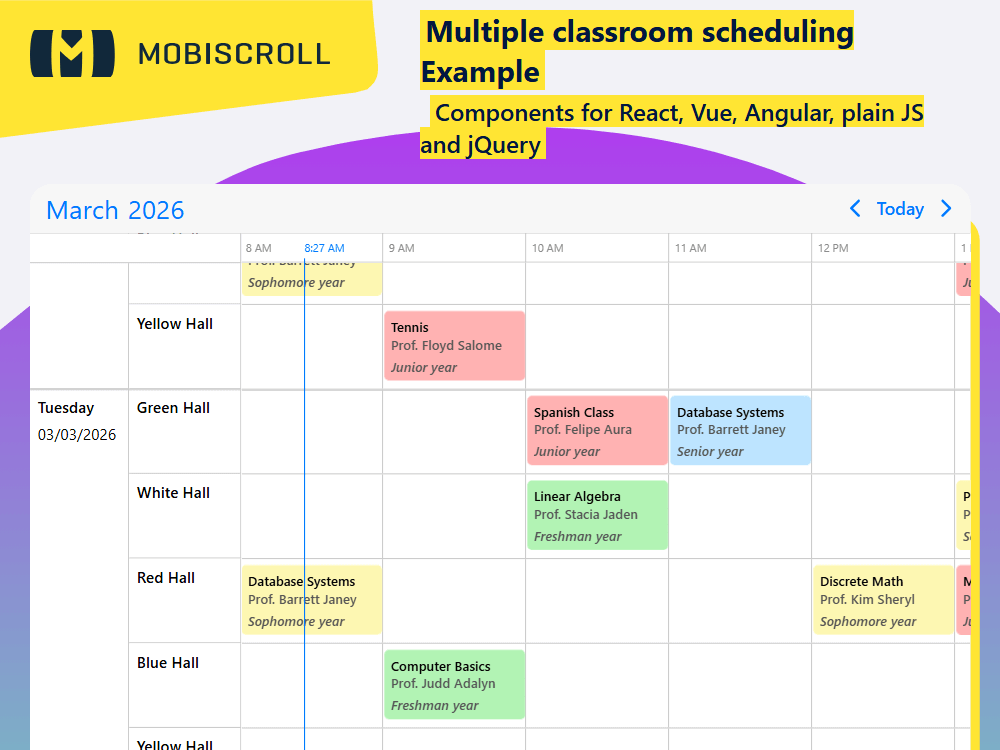
While the timeline can easily render multiple days horizontally with hourly resolutions, in some situations it makes sense to multiply the vertical scrolling height and set a resolutionVertical to day even if working with multiple resources.
To render a timetable for multiple classrooms for a whole week the horizontal timeline can be reduced from 8AM to 8PM and days along with the classrooms can be listed vertically Monday to Friday.
Use the resolutionVertical and startTime/endTime properties in combination with the startDay/endDay properties of the timeline to set such a view up.
Demo
Code
View code on GitHub
import { Eventcalendar, formatDate, getJson, setOptions  } from '@mobiscroll/react';
import { useCallback, useEffect, useMemo, useState } from 'react';

setOptions({
  locale:  ,
  theme: ' ',
  themeVariant: ' '
});

function App() {
  const [myEvents, setEvents] = useState([]);

  const myView = useMemo(
    () => ({
      timeline: {
        type: 'week',
        startDay: 1,
        endDay: 5,
        startTime: '08:00',
        endTime: '20:00',
        resolutionHorizontal: 'hour',
        resolutionVertical: 'day',
      },
    }),
    [],
  );

  const myResources = useMemo(
    () => [
      {
        id: 1,
        name: 'Green Hall',
      },
      {
        id: 2,
        name: 'White Hall',
      },
      {
        id: 3,
        name: 'Red Hall',
      },
      {
        id: 4,
        name: 'Blue Hall',
      },
      {
        id: 5,
        name: 'Yellow Hall',
      },
    ],
    [],
  );

  const myCustomDay = useCallback((day) => {
    const date = day.date;
    return (
      <div className="md-timetable-day">
        <div className="md-timetable-day-name">{formatDate('DDDD', date)}</div>
        <div>{formatDate('MM/DD/YYY', date)}</div>
      </div>
    );
  }, []);

  const myCustomEvent = useCallback(
    (args) => (
      <div>
        <div className="md-timetable-event-title">{args.title}</div>
        <div className="md-timetable-event-prop">Prof. {args.original.prof}</div>
        <div className="md-timetable-event-class">{args.original.class} year</div>
      </div>
    ),
    [],
  );

  const myDefaultEvent = useCallback(
    () => ({
      title: 'New class',
      prof: 'Stacia Jaden',
      class: 'Junior',
      color: '#ff0000',
    }),
    [],
  );

  useEffect(() => {
    getJson(
      'https://trial.mobiscroll.com/timetable-events/',
      (events) => {
        setEvents(events);
      },
      'jsonp',
    );
  }, []);

  return (
    <Eventcalendar
      className="md-timetable"
      clickToCreate={ }
      dragToCreate={ }
      dragToMove={ }
      dragToResize={ }
      eventDelete={ }
      view={myView}
      data={myEvents}
      resources={myResources}
      renderTimelineDay={myCustomDay}
      renderTimelineEventContent={myCustomEvent}
      extendDefaultEvent={myDefaultEvent}
    />
  );
}

export default App;
import {
  Eventcalendar,
  formatDate,
  getJson,
  // MbscCalendarDayData,
  MbscCalendarEvent,
  MbscCalendarEventData,
  MbscEventcalendarView,
  MbscResource,
  setOptions ,
} from '@mobiscroll/react';
import { FC, useCallback, useEffect, useMemo, useState } from 'react';

setOptions({
  locale:  ,
  theme: ' ',
  themeVariant: ' '
});

const App: FC = () => {
  const [myEvents, setEvents] = useState<MbscCalendarEvent[]>([]);

  const myView = useMemo<MbscEventcalendarView>(
    () => ({
      timeline: {
        type: 'week',
        startDay: 1,
        endDay: 5,
        startTime: '08:00',
        endTime: '20:00',
        resolutionHorizontal: 'hour',
        resolutionVertical: 'day',
      },
    }),
    [],
  );

  const myResources = useMemo<MbscResource[]>(
    () => [
      {
        id: 1,
        name: 'Green Hall',
      },
      {
        id: 2,
        name: 'White Hall',
      },
      {
        id: 3,
        name: 'Red Hall',
      },
      {
        id: 4,
        name: 'Blue Hall',
      },
      {
        id: 5,
        name: 'Yellow Hall',
      },
    ],
    [],
  );

  const myCustomDay = useCallback((day: { date: Date }) => {
    const date = day.date;
    return (
      <div className="md-timetable-day">
        <div className="md-timetable-day-name">{formatDate('DDDD', date)}</div>
        <div>{formatDate('MM/DD/YYY', date)}</div>
      </div>
    );
  }, []);

  const myCustomEvent = useCallback(
    (args: MbscCalendarEventData) => (
      <div>
        <div className="md-timetable-event-title">{args.title}</div>
        <div className="md-timetable-event-prop">Prof. {args.original!.prof}</div>
        <div className="md-timetable-event-class">{args.original!.class} year</div>
      </div>
    ),
    [],
  );

  const myDefaultEvent = useCallback(
    () => ({
      title: 'New class',
      prof: 'Stacia Jaden',
      class: 'Junior',
      color: '#ff0000',
    }),
    [],
  );

  useEffect(() => {
    getJson(
      'https://trial.mobiscroll.com/timetable-events/',
      (events: MbscCalendarEvent[]) => {
        setEvents(events);
      },
      'jsonp',
    );
  }, []);

  return (
    <Eventcalendar
      className="md-timetable"
      clickToCreate={ }
      dragToCreate={ }
      dragToMove={ }
      dragToResize={ }
      eventDelete={ }
      view={myView}
      data={myEvents}
      resources={myResources}
      renderTimelineDay={myCustomDay}
      renderTimelineEventContent={myCustomEvent}
      extendDefaultEvent={myDefaultEvent}
    />
  );
};

export default App;
.md-timetable .mbsc-timeline-row-date-col {
  width: 90px;
}

.md-timetable .mbsc-timeline-row-gutter {
  height: 8px;
}

.md-timetable .mbsc-timeline-column,
.md-timetable .mbsc-timeline-header-column {
  width: 130px;
}

.md-timetable .mbsc-schedule-event-range {
  display: none;
}

.md-timetable-day {
  font-size: 14px;
  padding: 7px;
}

.md-timetable-day-name {
  font-weight: 600;
  padding-bottom: 5px;
}

.md-timetable-event-title {
  font-size: 12px;
  line-height: 18px;
}

.md-timetable-event-prop {
  padding-bottom: 5px;
  opacity: 0.6;
}

.md-timetable-event-class {
  opacity: 0.6;
  font-style: italic;
}