Resource Headers
Usage
theme: 'ios' You can turn auto theming on and let it decide based on the platform.
Usage
themeVariant: 'light' You can turn auto dark mode on based on system settings.
Usage
  clickToCreate: true,
// click to create is on   dragToCreate: true,
// drag to create is on   dragToMove: true,
// reordering is on   dragToResize: true,
// resizing is on   eventDelete: true
// deleting is on
Fine-tune drag & drop with these options, which are false by default.
Usage
locale: localeEn Selecting the locale loads the localized settings and the translated UI text.
Resource Headers
Use the resource template for setting up a custom resource header. Customize how the resource headers look and what they show. Utilize properties passed in the resources array.
Interested in displaying resource information on hover? Show details on hover →
Demo
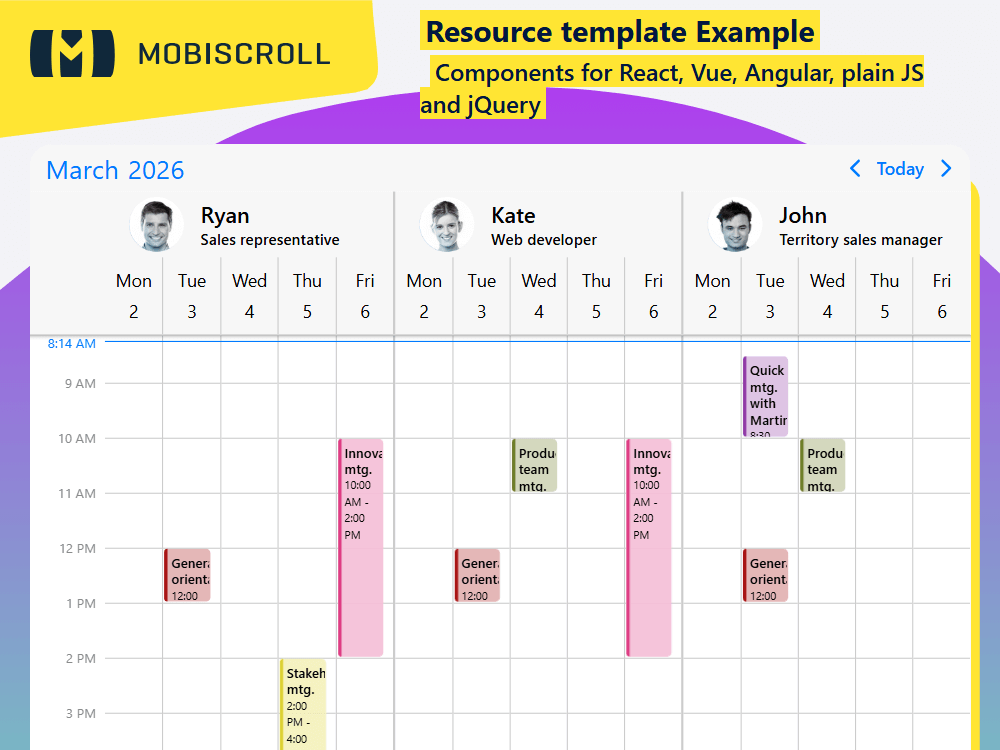
Code
View code on GitHub
<script setup>
import { MbscEventcalendar, setOptions  } from '@mobiscroll/vue'
import { ref } from 'vue'

setOptions({
  locale:  ,
  theme: ' ',
  themeVariant: ' '
})

const myEvents = ref([
  {
    start: '2026-10-27T10:00',
    end: '2026-10-27T15:00',
    title: 'Impact Training',
    resource: [2, 3],
    color: '#35bb5a'
  },
  {
    start: '2026-10-28T10:00',
    end: '2026-10-28T15:00',
    title: 'Impact Training',
    resource: [2, 3],
    color: '#35bb5a'
  },
  {
    start: '2026-10-30T08:30',
    end: '2026-10-30T10:00',
    title: 'Quick mtg. with Martin',
    resource: 3,
    color: '#913aa7'
  },
  {
    start: '2026-10-30T12:00',
    end: '2026-10-30T13:00',
    title: 'General orientation',
    resource: [1, 2, 3],
    color: '#a71111'
  },
  {
    start: '2026-10-31T10:00',
    end: '2026-10-31T11:00',
    title: 'Product team mtg.',
    resource: [2, 3],
    color: '#6e7f29'
  },
  {
    start: '2026-11-01T14:00',
    end: '2026-11-01T16:00',
    title: 'Stakeholder mtg.',
    resource: 1,
    color: '#dcd234'
  },
  {
    start: '2026-11-02T10:00',
    end: '2026-11-02T14:00',
    title: 'Innovation mtg.',
    resource: [1, 2],
    color: '#de3d83'
  }
])

const myResources = ref([
  {
    id: 1,
    name: 'Ryan',
    color: '#f7c4b4',
    description: 'Sales representative',
    img: 'https://img.mobiscroll.com/demos/m1.png'
  },
  {
    id: 2,
    name: 'Kate',
    color: '#c6f1c9',
    description: 'Web developer',
    img: 'https://img.mobiscroll.com/demos/f3.png'
  },
  {
    id: 3,
    name: 'John',
    color: '#e8d0ef',
    description: 'Territory sales manager',
    img: 'https://img.mobiscroll.com/demos/m2.png'
  }
])

const myView = {
  scheduler: {
    type: 'week',
    allDay: false,
    startDay: 1,
    endDay: 5,
    startTime: '05:00',
    endTime: '22:00'
  }
}
</script>

<template>
  <MbscEventcalendar :clickToCreate="" :dragToCreate="" :dragToMove="" :dragToResize="" :eventDelete="" :view="myView" :data="myEvents" :resources="myResources">
    <template #resource="resource">
      <div class="resource-template-content">
        <div class="resource-name">{{ resource.name }}</div>
        <div class="resource-description">{{ resource.description }}</div>
        <img class="resource-avatar" :src="resource.img" />
      </div>
    </template>
  </MbscEventcalendar>
</template>

<style>
.resource-template-content {
  position: relative;
  padding-left: 80px;
  text-align: left;
}

.resource-avatar {
  position: absolute;
  max-height: 50px;
  max-width: 50px;
  top: 50%;
  -webkit-transform: translate(-50%, -50%);
  transform: translate(-50%, -50%);
  left: 40px;
}

.resource-name {
  font-size: 20px;
}
</style>
<script setup lang="ts">
import { MbscEventcalendar, setOptions } from '@mobiscroll/vue'
import type { MbscCalendarEvent, MbscEventcalendarView, MbscResource } from '@mobiscroll/vue'
import { ref } from 'vue'
setOptions({
locale: ,
theme: ' ',
themeVariant: ' '
})
const myEvents = ref<MbscCalendarEvent[]>([
{
start: '2026-10-27T10:00',
end: '2026-10-27T15:00',
title: 'Impact Training',
resource: [2, 3],
color: '#35bb5a'
},
{
start: '2026-10-28T10:00',
end: '2026-10-28T15:00',
title: 'Impact Training',
resource: [2, 3],
color: '#35bb5a'
},
{
start: '2026-10-30T08:30',
end: '2026-10-30T10:00',
title: 'Quick mtg. with Martin',
resource: 3,
color: '#913aa7'
},
{
start: '2026-10-30T12:00',
end: '2026-10-30T13:00',
title: 'General orientation',
resource: [1, 2, 3],
color: '#a71111'
},
{
start: '2026-10-31T10:00',
end: '2026-10-31T11:00',
title: 'Product team mtg.',
resource: [2, 3],
color: '#6e7f29'
},
{
start: '2026-11-01T14:00',
end: '2026-11-01T16:00',
title: 'Stakeholder mtg.',
resource: 1,
color: '#dcd234'
},
{
start: '2026-11-02T10:00',
end: '2026-11-02T14:00',
title: 'Innovation mtg.',
resource: [1, 2],
color: '#de3d83'
}
])
const myResources = ref<MbscResource[]>([
{
id: 1,
name: 'Ryan',
color: '#f7c4b4',
description: 'Sales representative',
img: 'https://img.mobiscroll.com/demos/m1.png'
},
{
id: 2,
name: 'Kate',
color: '#c6f1c9',
description: 'Web developer',
img: 'https://img.mobiscroll.com/demos/f3.png'
},
{
id: 3,
name: 'John',
color: '#e8d0ef',
description: 'Territory sales manager',
img: 'https://img.mobiscroll.com/demos/m2.png'
}
])
const myView: MbscEventcalendarView = {
scheduler: {
type: 'week',
allDay: false,
startDay: 1,
endDay: 5,
startTime: '05:00',
endTime: '22:00'
}
}
</script>
<template>
<MbscEventcalendar :clickToCreate="" :dragToCreate="" :dragToMove="" :dragToResize="" :eventDelete="" :view="myView" :data="myEvents" :resources="myResources">
<template #resource="resource">
<div class="resource-template-content">
<div class="resource-name">{{ resource.name }}</div>
<div class="resource-description">{{ resource.description }}</div>
<img class="resource-avatar" :src="resource.img" />
</div>
</template>
</MbscEventcalendar>
</template>
<style>
.resource-template-content {
position: relative;
padding-left: 80px;
text-align: left;
}
.resource-avatar {
position: absolute;
max-height: 50px;
max-width: 50px;
top: 50%;
-webkit-transform: translate(-50%, -50%);
transform: translate(-50%, -50%);
left: 40px;
}
.resource-name {
font-size: 20px;
}
</style>