Switch Between Calendar and Scheduler Views
Usage
theme: 'ios' You can turn auto theming on and let it decide based on the platform.
Usage
themeVariant: 'light' You can turn auto dark mode on based on system settings.
Usage
  clickToCreate: true,
// click to create is on   dragToCreate: true,
// drag to create is on   dragToMove: true,
// reordering is on   dragToResize: true,
// resizing is on   eventDelete: true
// deleting is on
Fine-tune drag & drop with these options, which are false by default.
Usage
locale: localeEn Selecting the locale loads the localized settings and the translated UI text.
Switch Between Calendar and Scheduler Views
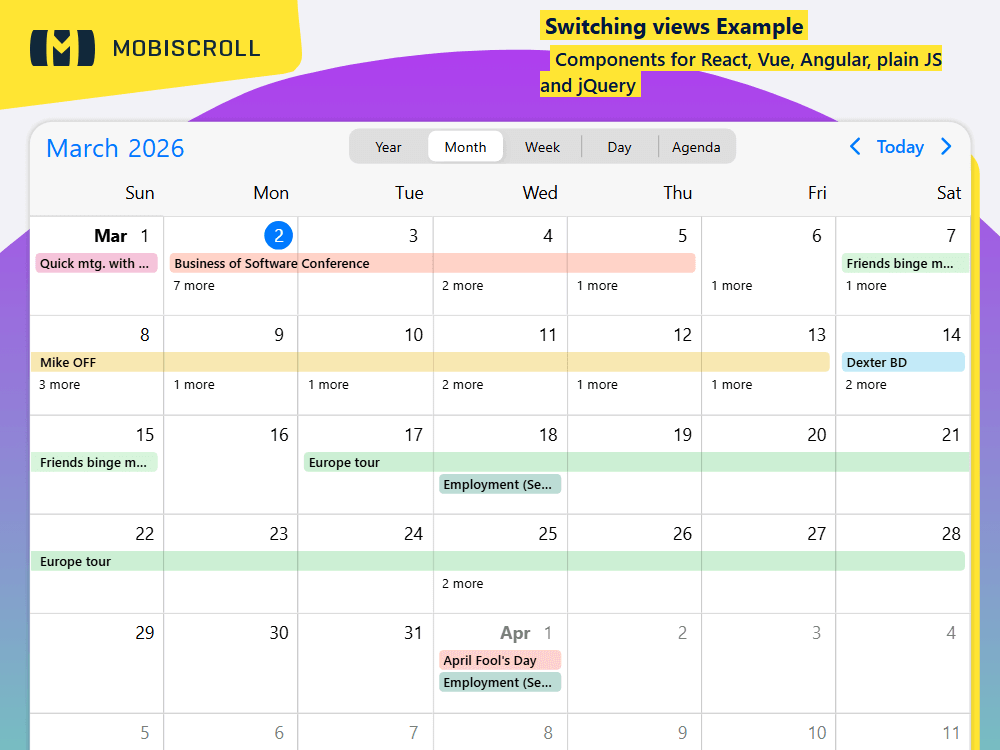
Dynamically switch views within one instance. Use a UI control to let users do the switching or do it programmatically.
The example features a month view with events as labels, a weekly schedule view, a daily schedule and a weekly agenda. Use property binding and when the value of the property changes the settings propagate.
Demo
Code
View code on GitHub
<script setup>
import {
  getJson,
  MbscCalendarNav,
  MbscCalendarNext,
  MbscCalendarPrev,
  MbscCalendarToday,
  MbscEventcalendar,
  MbscSegmented,
  MbscSegmentedGroup,
  setOptions
} from '@mobiscroll/vue'
import { onMounted, ref } from 'vue'

setOptions({
  locale:  ,
  theme: ' ',
  themeVariant: ' '
})

const myEvents = ref([])
const view = ref('month')
const myView = ref({
  calendar: {
    labels: true
  }
})

function changeView() {
  let calView

  switch (view.value) {
    case 'year':
      calView = {
        calendar: { type: 'year' }
      }
      break
    case 'month':
      calView = {
        calendar: { labels: true }
      }
      break
    case 'week':
      calView = {
        scheduler: { type: 'week' }
      }
      break
    case 'day':
      calView = {
        scheduler: { type: 'day' }
      }
      break
    case 'agenda':
      calView = {
        calendar: { type: 'week' },
        agenda: { type: 'week' }
      }
      break
  }

  myView.value = calView
}

onMounted(() => {
  getJson(
    'https://trial.mobiscroll.com/events/?vers=5',
    (events) => {
      myEvents.value = events
    },
    'jsonp'
  )
})
</script>

<template>
  <MbscEventcalendar
    className="md-switching-view-cont"
    :view="myView"
    :data="myEvents"
    :height="750"
  >
    <template #header>
      <MbscCalendarNav className="cal-header-nav" />
      <div className="cal-header-picker">
        <MbscSegmentedGroup v-model="view" @change="changeView">
          <MbscSegmented value="year"> Year </MbscSegmented>
          <MbscSegmented value="month"> Month </MbscSegmented>
          <MbscSegmented value="week"> Week </MbscSegmented>
          <MbscSegmented value="day"> Day </MbscSegmented>
          <MbscSegmented value="agenda"> Agenda </MbscSegmented>
        </MbscSegmentedGroup>
      </div>
      <MbscCalendarPrev className="cal-header-prev" />
      <MbscCalendarToday className="cal-header-today" />
      <MbscCalendarNext className="cal-header-next" />
    </template>
  </MbscEventcalendar>
</template>

<style>
.md-switching-view-cont .mbsc-segmented {
  max-width: 350px;
  margin: 0 auto;
}

.md-switching-view-cont .mbsc-calendar-grid-item {
  height: 490px;
  box-sizing: border-box;
}

.cal-header-picker {
  flex: 1 0 auto;
}

.cal-header-nav {
  width: 200px;
}

/* material header order */

.mbsc-material.cal-header-prev {
  order: 1;
}

.mbsc-material.cal-header-next {
  order: 2;
}

.mbsc-material.cal-header-nav {
  order: 3;
}

.mbsc-material .cal-header-picker {
  order: 4;
}

.mbsc-material .cal-header-today {
  order: 5;
}

/* windows header order */

.mbsc-windows.cal-header-nav {
  order: 1;
}

.mbsc-windows.cal-header-prev {
  order: 2;
}

.mbsc-windows.cal-header-next {
  order: 3;
}

.mbsc-windows .cal-header-picker {
  order: 4;
}

.mbsc-windows .cal-header-today {
  order: 5;
}
</style>
<script setup lang="ts">
import {
getJson,
MbscCalendarNav,
MbscCalendarNext,
MbscCalendarPrev,
MbscCalendarToday,
MbscEventcalendar,
MbscSegmented,
MbscSegmentedGroup,
setOptions
} from '@mobiscroll/vue'
import type { MbscCalendarEvent, MbscEventcalendarView } from '@mobiscroll/vue'
import { onMounted, ref } from 'vue'
setOptions({
locale: ,
theme: ' ',
themeVariant: ' '
})
const myEvents = ref<MbscCalendarEvent[]>([])
const view = ref<string>('month')
const myView = ref<MbscEventcalendarView>({
calendar: {
labels: true
}
})
function changeView() {
let calView: MbscEventcalendarView
switch (view.value) {
case 'year':
calView = {
calendar: { type: 'year' }
}
break
case 'week':
calView = {
scheduler: { type: 'week' }
}
break
case 'day':
calView = {
scheduler: { type: 'day' }
}
break
case 'agenda':
calView = {
calendar: { type: 'week' },
agenda: { type: 'week' }
}
break
default:
calView = {
calendar: { labels: true }
}
break
}
myView.value = calView
}
onMounted(() => {
getJson(
'https://trial.mobiscroll.com/events/?vers=5',
(events: MbscCalendarEvent[]) => {
myEvents.value = events
},
'jsonp'
)
})
</script>
<template>
<MbscEventcalendar
className="md-switching-view-cont"
:view="myView"
:data="myEvents"
:height="750"
>
<template #header>
<MbscCalendarNav className="cal-header-nav" />
<div className="cal-header-picker">
<MbscSegmentedGroup v-model="view" @change="changeView">
<MbscSegmented value="year"> Year </MbscSegmented>
<MbscSegmented value="month"> Month </MbscSegmented>
<MbscSegmented value="week"> Week </MbscSegmented>
<MbscSegmented value="day"> Day </MbscSegmented>
<MbscSegmented value="agenda"> Agenda </MbscSegmented>
</MbscSegmentedGroup>
</div>
<MbscCalendarPrev className="cal-header-prev" />
<MbscCalendarToday className="cal-header-today" />
<MbscCalendarNext className="cal-header-next" />
</template>
</MbscEventcalendar>
</template>
<style>
.md-switching-view-cont .mbsc-segmented {
max-width: 350px;
margin: 0 auto;
}
.md-switching-view-cont .mbsc-calendar-grid-item {
height: 490px;
box-sizing: border-box;
}
.cal-header-picker {
flex: 1 0 auto;
}
.cal-header-nav {
width: 200px;
}
/* material header order */
.mbsc-material.cal-header-prev {
order: 1;
}
.mbsc-material.cal-header-next {
order: 2;
}
.mbsc-material.cal-header-nav {
order: 3;
}
.mbsc-material .cal-header-picker {
order: 4;
}
.mbsc-material .cal-header-today {
order: 5;
}
/* windows header order */
.mbsc-windows.cal-header-nav {
order: 1;
}
.mbsc-windows.cal-header-prev {
order: 2;
}
.mbsc-windows.cal-header-next {
order: 3;
}
.mbsc-windows .cal-header-picker {
order: 4;
}
.mbsc-windows .cal-header-today {
order: 5;
}
</style>