Task Progress Tracking
Usage
theme: 'ios' You can turn auto theming on and let it decide based on the platform.
Usage
themeVariant: 'light' You can turn auto dark mode on based on system settings.
Usage
  clickToCreate: true,
// click to create is on   dragToCreate: true,
// drag to create is on   dragToMove: true,
// reordering is on   dragToResize: true,
// resizing is on   eventDelete: true
// deleting is on
Fine-tune drag & drop with these options, which are false by default.
Usage
locale: localeEn Selecting the locale loads the localized settings and the translated UI text.
Task Progress Tracking
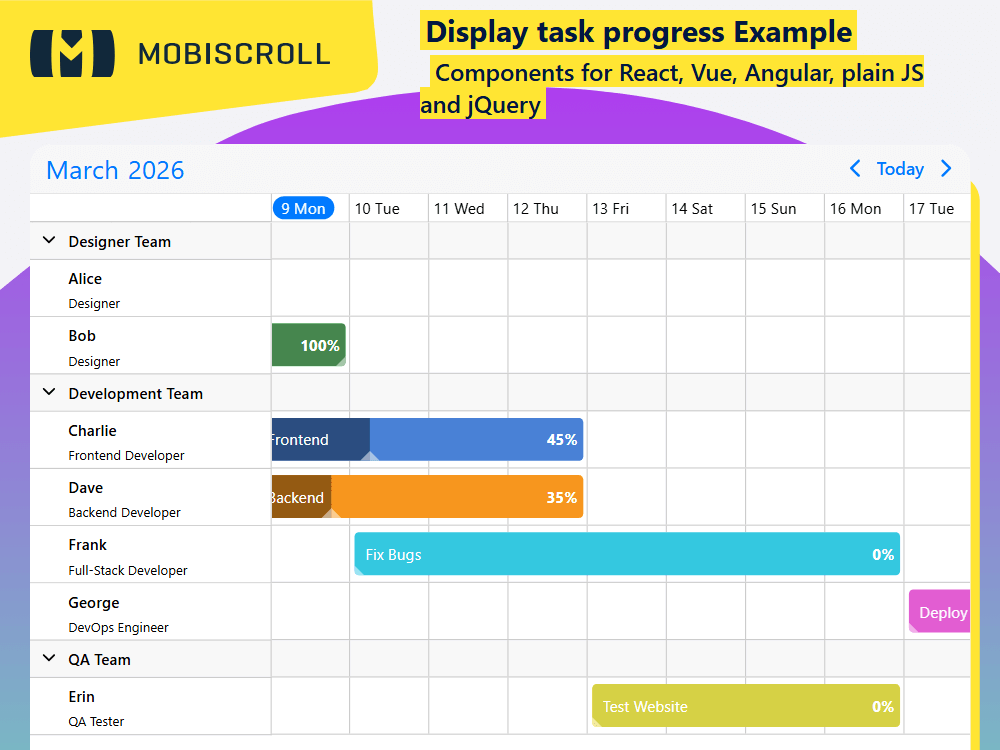
Showing percentage progress, or even having a visual overlay that indicates the progress of a task is sometimes necessary, not just for full fledged Gantt charts. Although being usually associated with Gantt charts, having a clear overview of progress with tools that enable live update is useful in a lot of situations.
Using the event templating capabilities, it is possible to render a live slider that reacts on hover and enables updating the progress inline. Use the timelineEvent slot to customize the template and adjust it to your needs.
Besides being able to update progress right on the event, it is also possible to add a slider that controls task progression - saved in a custom property of the event - inside an add/edit dialog.
Demo
Code
View code on GitHub
<script setup>
import {
  MbscDatepicker,
  MbscEventcalendar,
  MbscInput,
  MbscPopup,
  setOptions
} from '@mobiscroll/vue'
import { ref } from 'vue'

setOptions({
  locale:  ,
  theme: ' ',
  themeVariant: ' '
})

const myEvents = ref([
  {
    start: '2026-10-31T00:00',
    end: '2026-11-03T00:00',
    title: 'Design Homepage',
    resource: 'alice',
    progress: 100
  },
  {
    start: '2026-10-31T00:00',
    end: '2026-11-04T00:00',
    title: 'Create Wireframes',
    resource: 'bob',
    progress: 100
  },
  {
    start: '2026-11-02T00:00',
    end: '2026-11-07T00:00',
    title: 'Develop Frontend',
    resource: 'charlie',
    progress: 45
  },
  {
    start: '2026-11-02T00:00',
    end: '2026-11-07T00:00',
    title: 'Develop Backend',
    resource: 'dave',
    progress: 35
  },
  {
    start: '2026-11-07T00:00',
    end: '2026-11-11T00:00',
    title: 'Test Website',
    resource: 'erin',
    progress: 0
  },
  {
    start: '2026-11-04T00:00',
    end: '2026-11-11T00:00',
    title: 'Fix Bugs',
    resource: 'frank',
    progress: 0
  },
  {
    start: '2026-11-11T00:00',
    end: '2026-11-14T00:00',
    title: 'Deploy Website',
    resource: 'george',
    progress: 0
  }
])

const myResources = ref([
  {
    id: 'gro1',
    name: 'Designer Team',
    color: '#76e083',
    eventCreation: false,
    children: [
      {
        id: 'alice',
        name: 'Alice',
        title: 'Designer',
        color: '#1dab2f'
      },
      {
        id: 'bob',
        name: 'Bob',
        title: 'Designer',
        color: '#76e083'
      }
    ]
  },
  {
    id: 'gro2',
    name: 'Development Team',
    color: '#ff1717',
    eventCreation: false,
    children: [
      {
        id: 'charlie',
        name: 'Charlie',
        title: 'Frontend Developer',
        color: '#4981d6'
      },
      {
        id: 'dave',
        name: 'Dave',
        title: 'Backend Developer',
        color: '#f7961e'
      },
      {
        id: 'frank',
        name: 'Frank',
        title: 'Full-Stack Developer',
        color: '#34c8e0'
      },
      {
        id: 'george',
        name: 'George',
        title: 'DevOps Engineer',
        color: '#e25dd2'
      }
    ]
  },

  {
    id: 'gro3',
    name: 'QA Team',
    color: '#d6d145',
    eventCreation: false,
    children: [
      {
        id: 'erin',
        name: 'Erin',
        title: 'QA Tester',
        color: '#d6d145'
      }
    ]
  }
])

const myView = {
  timeline: {
    type: 'month',
    eventDisplay: 'fill'
  }
}

let isEdit = false
let isDraggingProgress = false

const isPopupOpen = ref(false)

const popupEventTitle = ref('')
const popupEventDates = ref([])
const popupEventProgress = ref(0)
const popupEventResource = ref('')

const popupAnchor = ref(null)
const popupButtons = ref([])
const popupHeaderText = ref('')

const popupResponsive = {
  medium: {
    display: 'anchored',
    width: 400,
    fullScreen: false,
    touchUi: false
  }
}

const datePickerStartInput = ref(null)
const datePickerEndInput = ref(null)

const datePickerResponsive = {
  medium: {
    touchUi: false
  }
}

function loadPopupForm(event) {
  popupEventTitle.value = event.title
  popupEventDates.value = [event.start, event.end]
  popupEventResource.value = event.resource
  popupEventProgress.value = event.progress || 0
}

function createAddPopup(event, target) {
  isEdit = false
  popupHeaderText.value = 'New event'
  popupButtons.value = [
    'cancel',
    {
      text: 'Add',
      keyCode: 'enter',
      handler: () => {
        const newEvent = {
          id: event.id,
          title: popupEventTitle.value,
          start: popupEventDates.value[0],
          end: popupEventDates.value[1],
          resource: popupEventResource.value,
          progress: popupEventProgress.value
        }
        // Add the new event to the list
        myEvents.value = [...myEvents.value, newEvent]
        isPopupOpen.value = false
      },
      cssClass: 'mbsc-popup-button-primary'
    }
  ]
  loadPopupForm(event)
  popupAnchor.value = target
  isPopupOpen.value = true
}

function createEditPopup(event, target) {
  isEdit = true
  popupHeaderText.value = 'Edit event'
  popupButtons.value = [
    'cancel',
    {
      text: 'Save',
      keyCode: 'enter',
      handler: () => {
        const updatedEvent = { ...event }
        updatedEvent.title = popupEventTitle.value
        updatedEvent.start = popupEventDates.value[0]
        updatedEvent.end = popupEventDates.value[1]
        updatedEvent.resource = popupEventResource.value
        updatedEvent.progress = popupEventProgress.value
        // Update the event in the list
        const newEventList = [...myEvents.value]
        const index = newEventList.findIndex((e) => e.id === updatedEvent.id)
        newEventList[index] = updatedEvent
        myEvents.value = newEventList
        isPopupOpen.value = false
      },
      cssClass: 'mbsc-popup-button-primary'
    }
  ]
  loadPopupForm(event)
  popupAnchor.value = target
  isPopupOpen.value = true
}

function handleEventCreated(args) {
  createAddPopup(args.event, args.target)
}

function handleEventDeleted(args) {
  myEvents.value = myEvents.value.filter((e) => e.id !== args.event.id)
}

function handleEventClick(args) {
  if (isDraggingProgress) {
    return
  }
  createEditPopup(args.event, args.domEvent.currentTarget)
}

function handlePopupClose() {
  if (!isEdit) {
    // Refresh the list, if add popup was canceled, to remove the temporary event
    myEvents.value = [...myEvents.value]
  }
  isPopupOpen.value = false
}

const handleProgressArrowMouseDown = (e) => {
  const progressArrow = e.target.closest('.mds-progress-arrow')

  if (!progressArrow) {
    return
  }

  e.stopPropagation()

  isDraggingProgress = true

  const progressBar = progressArrow.closest('.mds-progress-bar')
  const progressLabel = progressArrow
    .closest('.mds-progress-event')
    .querySelector('.mds-progress-label')
  const eventContainerWidth = progressBar.parentElement.offsetWidth
  const initialMouseX = e.pageX
  const initialProgress = parseFloat(progressBar.style.width.replace('%', ''))

  let newProgress

  const handleMouseMove = (e) => {
    const mouseXOffset = e.pageX - initialMouseX

    newProgress = Math.round(initialProgress + (mouseXOffset / eventContainerWidth) * 100)
    newProgress = Math.max(0, Math.min(100, newProgress))

    progressBar.style.width = `${newProgress}%`
    progressLabel.textContent = `${newProgress}%`
  }

  const handleMouseUp = () => {
    document.removeEventListener('mousemove', handleMouseMove)
    document.removeEventListener('mouseup', handleMouseUp)

    const eventId = progressArrow.dataset.eventId
    const eventToUpdate = myEvents.value.find((event) => event.id === eventId)
    eventToUpdate.progress = newProgress

    setTimeout(() => {
      isDraggingProgress = false
    }, 100)
  }

  document.addEventListener('mousemove', handleMouseMove)
  document.addEventListener('mouseup', handleMouseUp)
}
</script>

<template>
  <div @mousedown.capture="handleProgressArrowMouseDown">
    <MbscEventcalendar
      cssClass="mds-progress-calendar"
      :view="myView"
      :data="myEvents"
      :resources="myResources"
      :clickToCreate="true"
      :dragToCreate="true"
      :dragToMove="true"
      :dragToResize="true"
      @event-click="handleEventClick"
      @event-created="handleEventCreated"
      @event-deleted="handleEventDeleted"
    >
      <template #timelineEvent="data">
        <div class="mds-progress-event" :style="{ background: data.color }">
          <div class="mds-progress-bar" :style="{ width: (data.original.progress || 0) + '%' }">
            <div class="mds-progress-arrow" :data-event-id="data.id"></div>
          </div>
          <div class="mds-progress-event-content">
            <div class="mds-progress-event-title">{{ data.title }}</div>
          </div>
          <div class="mds-progress-label" :key="data.original.progress || 0">
            {{ data.original.progress || 0 }}%
          </div>
        </div>
      </template>

      <template #resource="resource">
        <div>
          <div class="mds-progress-employee-name">{{ resource.name }}</div>
          <div v-if="resource.title" class="mds-progress-employee-title">{{ resource.title }}</div>
        </div>
      </template>
    </MbscEventcalendar>

    <MbscPopup
      display="bottom"
      :contentPadding="false"
      :fullScreen="true"
      :isOpen="isPopupOpen"
      :responsive="popupResponsive"
      :anchor="popupAnchor"
      :buttons="popupButtons"
      :headerText="popupHeaderText"
      @close="handlePopupClose"
    >
      <div class="mbsc-form-group">
        <MbscInput label="Title" v-model="popupEventTitle" />
      </div>
      <div class="mbsc-form-group">
        <MbscInput ref="datePickerStartInput" label="Starts" />
        <MbscInput ref="datePickerEndInput" label="Ends" />
        <MbscDatepicker
          v-model="popupEventDates"
          select="range"
          :responsive="datePickerResponsive"
          :startInput="datePickerStartInput"
          :endInput="datePickerEndInput"
          :showRangeLabels="false"
        />
      </div>
      <div class="mbsc-form-group">
        <label class="mbsc-flex mbsc-align-items-center mbsc-padding">
          <span>Progress</span>
          <input
            class="mds-popup-progress-slider mbsc-flex-1-0"
            type="range"
            min="0"
            max="100"
            v-model="popupEventProgress"
          />
          <span class="mds-popup-progress-label">{{ popupEventProgress }}%</span>
        </label>
      </div>
    </MbscPopup>
  </div>
</template>

<style>
.mds-progress-calendar .mbsc-timeline-row-gutter {
  height: 6px;
}

.mds-progress-calendar .mbsc-timeline-parent {
  height: 34px;
}

.mds-popup-progress-slider {
  margin: 0 10px;
}

.mds-popup-progress-label {
  margin-left: 10px;
  width: 50px;
  text-align: right;
}

.mds-progress-event {
  border-radius: 4px;
  position: relative;
  overflow: hidden;
  line-height: 19px;
}

.mds-progress-event-content {
  padding: 10px 0;
  margin-right: 50px;
}

.mds-progress-event-title {
  position: relative;
  color: white;
  font-size: 14px;
  padding: 0 10px;
  white-space: nowrap;
  text-overflow: ellipsis;
  overflow: hidden;
}

.mds-progress-bar {
  position: absolute;
  top: 0;
  height: 100%;
  background-color: rgba(0, 0, 0, 0.4);
}

.mds-progress-arrow {
  position: absolute;
  right: -9px;
  bottom: 0;
  border-style: solid;
  border-width: 0 9px 9px 9px;
  border-color: transparent transparent rgba(255, 255, 255, 0.5) transparent;
  cursor: ew-resize;
}

.mds-progress-dragging {
  background-color: rgba(0, 0, 0, 0.5);
}

.mds-progress-dragging .mds-progress-arrow,
.mds-progress-arrow:hover {
  right: -12px;
  border-width: 0 12px 12px 12px;
  border-color: transparent transparent white transparent;
}

.mds-progress-label {
  position: absolute;
  right: 5px;
  top: 50%;
  margin-top: -10px;
  color: white;
  font-weight: bold;
  font-size: 14px;
}

.mds-progress-employee-name {
  font-size: 14px;
}

.mds-progress-employee-title {
  font-size: 12px;
  font-weight: 400;
  margin-top: 5px;
}
</style>
<script setup lang="ts">
import {
MbscDatepicker,
MbscEventcalendar,
MbscInput,
MbscPopup,
setOptions
} from '@mobiscroll/vue'
import type {
MbscCalendarEvent,
MbscDatepickerOptions,
MbscDateType,
MbscEventcalendarView,
MbscEventClickEvent,
MbscEventCreatedEvent,
MbscEventDeletedEvent,
MbscPopupButton,
MbscPopupOptions
} from '@mobiscroll/vue'
import { ref } from 'vue'
setOptions({
locale: ,
theme: ' ',
themeVariant: ' '
})
const myEvents = ref<MbscCalendarEvent[]>([
{
start: '2026-10-31T00:00',
end: '2026-11-03T00:00',
title: 'Design Homepage',
resource: 'alice',
progress: 100
},
{
start: '2026-10-31T00:00',
end: '2026-11-04T00:00',
title: 'Create Wireframes',
resource: 'bob',
progress: 100
},
{
start: '2026-11-02T00:00',
end: '2026-11-07T00:00',
title: 'Develop Frontend',
resource: 'charlie',
progress: 45
},
{
start: '2026-11-02T00:00',
end: '2026-11-07T00:00',
title: 'Develop Backend',
resource: 'dave',
progress: 35
},
{
start: '2026-11-07T00:00',
end: '2026-11-11T00:00',
title: 'Test Website',
resource: 'erin',
progress: 0
},
{
start: '2026-11-04T00:00',
end: '2026-11-11T00:00',
title: 'Fix Bugs',
resource: 'frank',
progress: 0
},
{
start: '2026-11-11T00:00',
end: '2026-11-14T00:00',
title: 'Deploy Website',
resource: 'george',
progress: 0
}
])
const myResources = ref([
{
id: 'gro1',
name: 'Designer Team',
color: '#76e083',
eventCreation: false,
children: [
{
id: 'alice',
name: 'Alice',
title: 'Designer',
color: '#1dab2f'
},
{
id: 'bob',
name: 'Bob',
title: 'Designer',
color: '#76e083'
}
]
},
{
id: 'gro2',
name: 'Development Team',
color: '#ff1717',
eventCreation: false,
children: [
{
id: 'charlie',
name: 'Charlie',
title: 'Frontend Developer',
color: '#4981d6'
},
{
id: 'dave',
name: 'Dave',
title: 'Backend Developer',
color: '#f7961e'
},
{
id: 'frank',
name: 'Frank',
title: 'Full-Stack Developer',
color: '#34c8e0'
},
{
id: 'george',
name: 'George',
title: 'DevOps Engineer',
color: '#e25dd2'
}
]
},
{
id: 'gro3',
name: 'QA Team',
color: '#d6d145',
eventCreation: false,
children: [
{
id: 'erin',
name: 'Erin',
title: 'QA Tester',
color: '#d6d145'
}
]
}
])
const myView: MbscEventcalendarView = {
timeline: {
type: 'month',
eventDisplay: 'fill'
}
}
let isEdit = false
let isDraggingProgress = false
const isPopupOpen = ref(false)
const popupEventTitle = ref<string | undefined>('')
const popupEventDates = ref<MbscDateType[]>([])
const popupEventProgress = ref<number>(0)
const popupEventResource = ref<string | number | (string | number)[] | undefined>('')
const popupAnchor = ref<HTMLElement>()
const popupButtons = ref<(string | MbscPopupButton)[]>([])
const popupHeaderText = ref('')
const popupResponsive: { [key: string]: MbscPopupOptions } = {
medium: {
display: 'anchored',
width: 400,
fullScreen: false,
touchUi: false
}
}
const datePickerStartInput = ref<typeof MbscInput>()
const datePickerEndInput = ref<typeof MbscInput>()
const datePickerResponsive: { [key: string]: MbscDatepickerOptions } = {
medium: {
touchUi: false
}
}
function loadPopupForm(event: MbscCalendarEvent) {
popupEventTitle.value = event.title
popupEventDates.value = [event.start as Date, event.end as Date]
popupEventResource.value = event.resource
popupEventProgress.value = event.progress || 0
}
function createAddPopup(event: MbscCalendarEvent, target?: HTMLElement) {
isEdit = false
popupHeaderText.value = 'New event'
popupButtons.value = [
'cancel',
{
text: 'Add',
keyCode: 'enter',
handler: () => {
const newEvent: MbscCalendarEvent = {
id: event.id,
title: popupEventTitle.value,
start: popupEventDates.value[0],
end: popupEventDates.value[1],
resource: popupEventResource.value,
progress: popupEventProgress.value
}
// Add the new event to the list
myEvents.value = [...myEvents.value, newEvent]
isPopupOpen.value = false
},
cssClass: 'mbsc-popup-button-primary'
}
]
loadPopupForm(event)
popupAnchor.value = target
isPopupOpen.value = true
}
function createEditPopup(event: MbscCalendarEvent, target?: HTMLElement) {
isEdit = true
popupHeaderText.value = 'Edit event'
popupButtons.value = [
'cancel',
{
text: 'Save',
keyCode: 'enter',
handler: () => {
const updatedEvent = { ...event }
updatedEvent.title = popupEventTitle.value
updatedEvent.start = popupEventDates.value[0]
updatedEvent.end = popupEventDates.value[1]
updatedEvent.resource = popupEventResource.value
updatedEvent.progress = popupEventProgress.value
// Update the event in the list
const newEventList = [...myEvents.value]
const index = newEventList.findIndex((x) => x.id === updatedEvent.id)
newEventList[index] = updatedEvent
myEvents.value = newEventList
isPopupOpen.value = false
},
cssClass: 'mbsc-popup-button-primary'
}
]
loadPopupForm(event)
popupAnchor.value = target
isPopupOpen.value = true
}
function handleEventCreated(args: MbscEventCreatedEvent) {
createAddPopup(args.event, args.target)
}
function handleEventDeleted(args: MbscEventDeletedEvent) {
myEvents.value = myEvents.value.filter((e) => e.id !== args.event.id)
}
function handleEventClick(args: MbscEventClickEvent) {
if (isDraggingProgress) {
return
}
createEditPopup(args.event, args.domEvent.currentTarget)
}
function handlePopupClose() {
if (!isEdit) {
// Refresh the list, if add popup was canceled, to remove the temporary event
myEvents.value = [...myEvents.value]
}
isPopupOpen.value = false
}
const handleProgressArrowMouseDown = (e: MouseEvent) => {
const progressArrow = (e.target as HTMLDivElement).closest(
'.mds-progress-arrow'
) as HTMLDivElement
if (!progressArrow) {
return
}
e.stopPropagation()
isDraggingProgress = true
const progressBar = progressArrow.closest('.mds-progress-bar') as HTMLDivElement
const progressLabel = progressArrow
.closest('.mds-progress-event')!
.querySelector('.mds-progress-label') as HTMLDivElement
const eventContainerWidth = progressBar.parentElement!.offsetWidth
const initialMouseX = e.pageX
const initialProgress = parseFloat(progressBar.style.width.replace('%', ''))
let newProgress: number
const handleMouseMove = (e: MouseEvent) => {
const mouseXOffset = e.pageX - initialMouseX
newProgress = Math.round(initialProgress + (mouseXOffset / eventContainerWidth) * 100)
newProgress = Math.max(0, Math.min(100, newProgress))
progressBar.style.width = `${newProgress}%`
progressLabel.textContent = `${newProgress}%`
}
const handleMouseUp = () => {
document.removeEventListener('mousemove', handleMouseMove)
document.removeEventListener('mouseup', handleMouseUp)
const eventId = progressArrow.dataset.eventId
const eventToUpdate = myEvents.value.find((event) => event.id === eventId)!
eventToUpdate.progress = newProgress
setTimeout(() => {
isDraggingProgress = false
}, 100)
}
document.addEventListener('mousemove', handleMouseMove)
document.addEventListener('mouseup', handleMouseUp)
}
</script>
<template>
<div @mousedown.capture="handleProgressArrowMouseDown">
<MbscEventcalendar
cssClass="mds-progress-calendar"
:view="myView"
:data="myEvents"
:resources="myResources"
:clickToCreate="true"
:dragToCreate="true"
:dragToMove="true"
:dragToResize="true"
@event-click="handleEventClick"
@event-created="handleEventCreated"
@event-deleted="handleEventDeleted"
>
<template #timelineEvent="data">
<div class="mds-progress-event" :style="{ background: data.color }">
<div class="mds-progress-bar" :style="{ width: (data.original.progress || 0) + '%' }">
<div class="mds-progress-arrow" :data-event-id="data.id"></div>
</div>
<div class="mds-progress-event-content">
<div class="mds-progress-event-title">{{ data.title }}</div>
</div>
<div class="mds-progress-label" :key="data.original.progress || 0">
{{ data.original.progress || 0 }}%
</div>
</div>
</template>
<template #resource="resource">
<div>
<div class="mds-progress-employee-name">{{ resource.name }}</div>
<div v-if="resource.title" class="mds-progress-employee-title">{{ resource.title }}</div>
</div>
</template>
</MbscEventcalendar>
<MbscPopup
display="bottom"
:contentPadding="false"
:fullScreen="true"
:isOpen="isPopupOpen"
:responsive="popupResponsive"
:anchor="popupAnchor"
:buttons="popupButtons"
:headerText="popupHeaderText"
@close="handlePopupClose"
>
<div class="mbsc-form-group">
<MbscInput label="Title" v-model="popupEventTitle" />
</div>
<div class="mbsc-form-group">
<MbscInput ref="datePickerStartInput" label="Starts" />
<MbscInput ref="datePickerEndInput" label="Ends" />
<MbscDatepicker
v-model="popupEventDates"
select="range"
:responsive="datePickerResponsive"
:startInput="datePickerStartInput"
:endInput="datePickerEndInput"
:showRangeLabels="false"
/>
</div>
<div class="mbsc-form-group">
<label class="mbsc-flex mbsc-align-items-center mbsc-padding">
<span>Progress</span>
<input
class="mds-popup-progress-slider mbsc-flex-1-0"
type="range"
min="0"
max="100"
v-model="popupEventProgress"
/>
<span class="mds-popup-progress-label">{{ popupEventProgress }}%</span>
</label>
</div>
</MbscPopup>
</div>
</template>
<style>
.mds-progress-calendar .mbsc-timeline-row-gutter {
height: 6px;
}
.mds-progress-calendar .mbsc-timeline-parent {
height: 34px;
}
.mds-popup-progress-slider {
margin: 0 10px;
}
.mds-popup-progress-label {
margin-left: 10px;
width: 50px;
text-align: right;
}
.mds-progress-event {
border-radius: 4px;
position: relative;
overflow: hidden;
line-height: 19px;
}
.mds-progress-event-content {
padding: 10px 0;
margin-right: 50px;
}
.mds-progress-event-title {
position: relative;
color: white;
font-size: 14px;
padding: 0 10px;
white-space: nowrap;
text-overflow: ellipsis;
overflow: hidden;
}
.mds-progress-bar {
position: absolute;
top: 0;
height: 100%;
background-color: rgba(0, 0, 0, 0.4);
}
.mds-progress-arrow {
position: absolute;
right: -9px;
bottom: 0;
border-style: solid;
border-width: 0 9px 9px 9px;
border-color: transparent transparent rgba(255, 255, 255, 0.5) transparent;
cursor: ew-resize;
}
.mds-progress-dragging {
background-color: rgba(0, 0, 0, 0.5);
}
.mds-progress-dragging .mds-progress-arrow,
.mds-progress-arrow:hover {
right: -12px;
border-width: 0 12px 12px 12px;
border-color: transparent transparent white transparent;
}
.mds-progress-label {
position: absolute;
right: 5px;
top: 50%;
margin-top: -10px;
color: white;
font-weight: bold;
font-size: 14px;
}
.mds-progress-employee-name {
font-size: 14px;
}
.mds-progress-employee-title {
font-size: 12px;
font-weight: 400;
margin-top: 5px;
}
</style>