Prevent Event Overlap
Sometimes it is necessary to guarantee that events don't overlap - eg. when scheduling workorders, interacting with a work calendar. You can reject the updates or additions and let the user know about it.
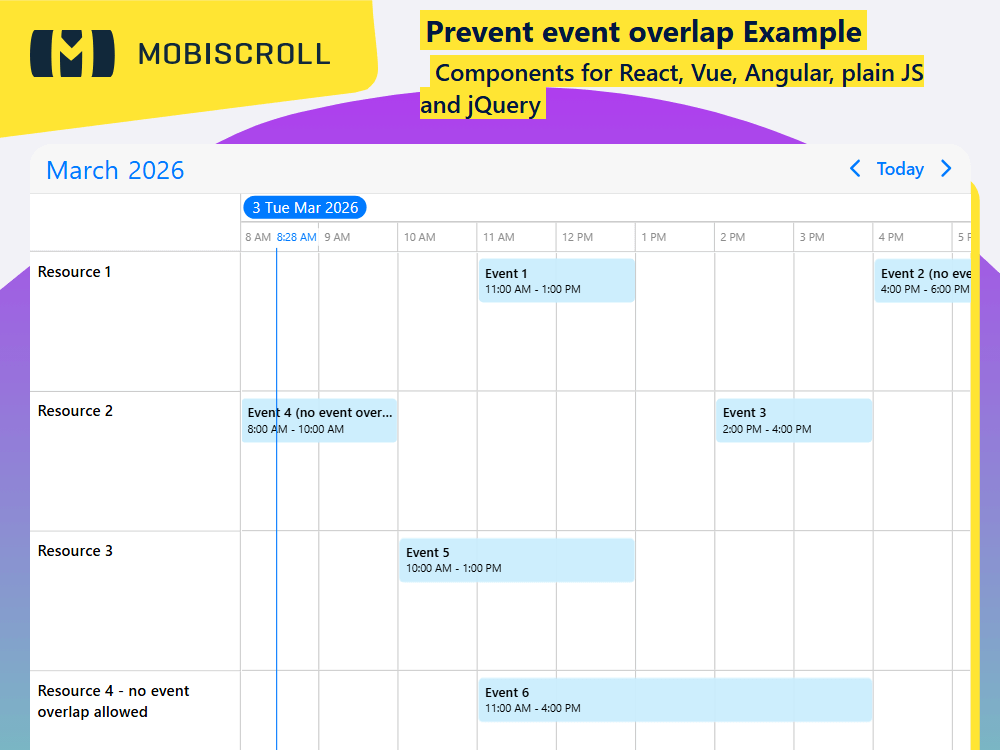
The event overlap can be turned on/off on an event basis, per resource or globally on the instance.
- On an event basis - by setting the
overlapproperty tofalsethe specified event cannot overlap. - Per resource - by setting the
eventOverlapproperty tofalsethe events in the specified resource cannot overlap. - Globally on the instance - by setting
eventOverlapoption tofalseoverlap is disbled globally.
If set to false, the resource and the event settings have precedence over the global calendar eventOverlap option.
Give feedback to the user - optionally, a toast can be displayed to explain why an event cannot be dropped, moved or created. For this we can use the onEventCreateFailed and onEventUpdateFailed lifecycle events.
Demo
Control the interaction globally (all events/resources)
Events cannot overlap
eventOverlap=false<script setup>
// relevant events
const myData = [{
start: '2026-10-25T16:00',
end: '2026-10-25T18:00',
title: 'Event 2 (no event overlap)',
overlap: false,
resource: 1
},{
start: '2026-10-25T08:00',
end: '2026-10-25T10:00',
title: 'Event 4 (no event overlap)',
overlap: false,
resource: 2
}];
// relevant resource
const myResources = [{
id: 4,
name: 'Resource 4 - no event overlap allowed',
eventOverlap: false
}];
</script>
<template>
<MbscEventcalendar
:view="{timeline: {type: 'day'}}"
:data="myData"
:resources:"myResources"
:clickToCreate="true"
:dragToCreate="true"
:dragToMove="true"
:dragToResize="true"
:eventOverlap="true "
/>
</template>
SFC JSSFC TS
<script setup>
import { MbscEventcalendar, MbscToast, setOptions  } from '@mobiscroll/vue'
import { ref } from 'vue'

setOptions({
  locale:  ,
  theme: ' ',
  themeVariant: ' '
})

const now = new Date()
const y = now.getFullYear()
const m = now.getMonth()
const d = now.getDate()

const toastMessage = 'Make sure not to double book'
const isToastOpen = ref(false)

function onEventFailed() {
  isToastOpen.value = true
}

function handleToastClose() {
  isToastOpen.value = false
}

const myView = {
  timeline: { type: 'day' }
}

const myEvents = ref([
  {
    start: new Date(y, m, d, 11),
    end: new Date(y, m, d, 13),
    title: 'Event 1',
    resource: 1
  },
  {
    start: new Date(y, m, d, 16),
    end: new Date(y, m, d, 17),
    title: 'Event 2 (no event overlap)',
    overlap: false,
    resource: 1
  },
  {
    start: new Date(y, m, d, 14),
    end: new Date(y, m, d, 16),
    title: 'Event 3',
    resource: 2
  },
  {
    start: new Date(y, m, d, 8),
    end: new Date(y, m, d, 10),
    title: 'Event 4 (no event overlap)',
    resource: 2,
    overlap: false
  },
  {
    start: new Date(y, m, d, 10),
    end: new Date(y, m, d, 13),
    title: 'Event 5',
    resource: 3
  },
  {
    start: new Date(y, m, d, 11),
    end: new Date(y, m, d, 16),
    title: 'Event 6',
    resource: 4
  }
])

const myResources = ref([
  {
    id: 1,
    name: 'Resource 1'
  },
  {
    id: 2,
    name: 'Resource 2'
  },
  {
    id: 3,
    name: 'Resource 3'
  },
  {
    id: 4,
    name: 'Resource 4 - no event overlap allowed',
    eventOverlap: false
  }
])
</script>

<template>
  <MbscEventcalendar
    :view="myView"
    :data="myEvents"
    :resources="myResources"
    :dragToMove="true"
    :dragToResize="true"
    :dragToCreate="true"
    :clickToCreate="true"
    :eventOverlap="true"
    @event-update-failed="onEventFailed"
    @event-create-failed="onEventFailed"
  />
  <MbscToast :message="toastMessage" :isOpen="isToastOpen" @close="handleToastClose" />
</template>
<script setup lang="ts">
import { MbscEventcalendar, MbscToast, setOptions  } from '@mobiscroll/vue'
import type { MbscCalendarEvent, MbscEventcalendarView, MbscResource } from '@mobiscroll/vue'
import { ref } from 'vue'

setOptions({
  locale:  ,
  theme: ' ',
  themeVariant: ' '
})

const now = new Date()
const y = now.getFullYear()
const m = now.getMonth()
const d = now.getDate()

const toastMessage = 'Make sure not to double book'
const isToastOpen = ref<boolean>(false)

function onEventFailed() {
  isToastOpen.value = true
}

function handleToastClose() {
  isToastOpen.value = false
}

const myView: MbscEventcalendarView = {
  timeline: { type: 'day' }
}

const myEvents = ref<MbscCalendarEvent[]>([
  {
    start: new Date(y, m, d, 11),
    end: new Date(y, m, d, 13),
    title: 'Event 1',
    resource: 1
  },
  {
    start: new Date(y, m, d, 16),
    end: new Date(y, m, d, 17),
    title: 'Event 2 (no event overlap)',
    overlap: false,
    resource: 1
  },
  {
    start: new Date(y, m, d, 14),
    end: new Date(y, m, d, 16),
    title: 'Event 3',
    resource: 2
  },
  {
    start: new Date(y, m, d, 8),
    end: new Date(y, m, d, 10),
    title: 'Event 4 (no event overlap)',
    resource: 2,
    overlap: false
  },
  {
    start: new Date(y, m, d, 10),
    end: new Date(y, m, d, 13),
    title: 'Event 5',
    resource: 3
  },
  {
    start: new Date(y, m, d, 11),
    end: new Date(y, m, d, 16),
    title: 'Event 6',
    resource: 4
  }
])

const myResources = ref<MbscResource[]>([
  {
    id: 1,
    name: 'Resource 1'
  },
  {
    id: 2,
    name: 'Resource 2'
  },
  {
    id: 3,
    name: 'Resource 3'
  },
  {
    id: 4,
    name: 'Resource 4 - no event overlap allowed',
    eventOverlap: false
  }
])
</script>

<template>
  <MbscEventcalendar
    :view="myView"
    :data="myEvents"
    :resources="myResources"
    :dragToMove="true"
    :dragToResize="true"
    :dragToCreate="true"
    :clickToCreate="true"
    :eventOverlap="true"
    @event-update-failed="onEventFailed"
    @event-create-failed="onEventFailed"
  />
  <MbscToast :message="toastMessage" :isOpen="isToastOpen" @close="handleToastClose" />
</template>