Multiple Timezone Support
Usage
theme: 'ios' You can turn auto theming on and let it decide based on the platform.
Usage
themeVariant: 'light' You can turn auto dark mode on based on system settings.
Usage
  clickToCreate: true,
// click to create is on   dragToCreate: true,
// drag to create is on   dragToMove: true,
// reordering is on   dragToResize: true,
// resizing is on   eventDelete: true
// deleting is on
Fine-tune drag & drop with these options, which are false by default.
Usage
locale: localeEn Selecting the locale loads the localized settings and the translated UI text.
Multiple Timezone Support
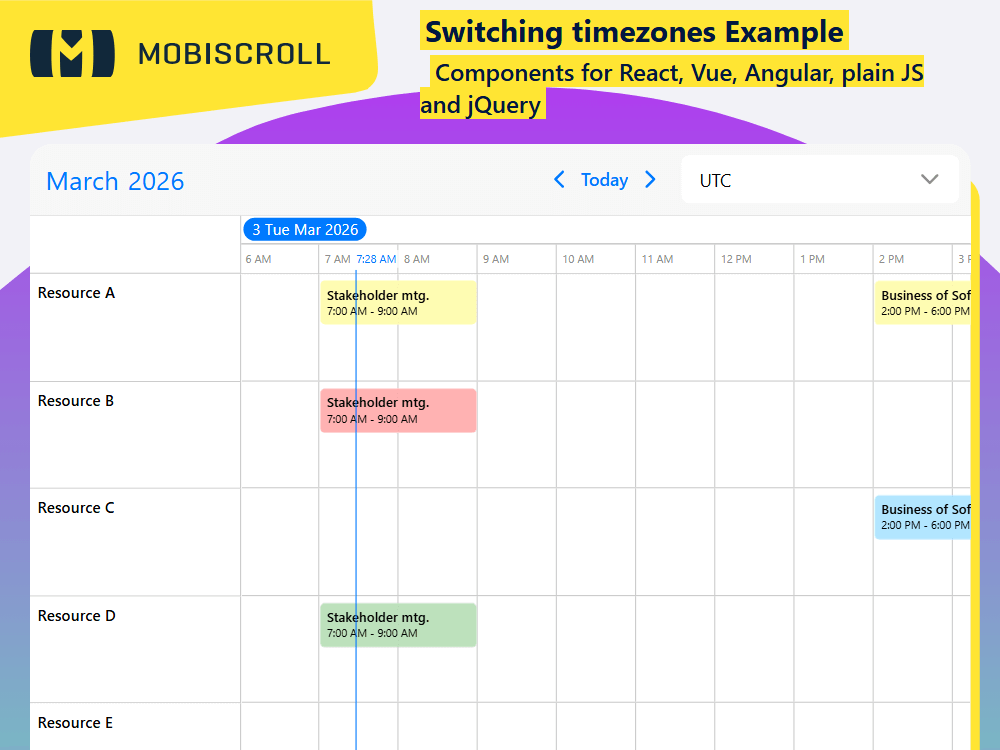
If the context requires users being able to change the timezone on the fly, you can add a custom dropdown with the desired timezones to the event calendar header. This can be of course placed externally to the calendar as well, eg. setting page.
Set the timezone of the incoming data through the dataTimezone - eg. 'utc', and set the display timezone through the displayTimezone - eg. 'America/Los_Angeles'
Demo
Code
View code on GitHub
<script setup>
import {
  dayjsTimezone,
  MbscCalendarNav,
  MbscCalendarNext,
  MbscCalendarPrev,
  MbscCalendarToday,
  MbscEventcalendar,
  MbscSelect,
  setOptions
} from '@mobiscroll/vue'
import dayjs from 'dayjs'
import timezone from 'dayjs/plugin/timezone'
import utc from 'dayjs/plugin/utc'
import { ref } from 'vue'

dayjs.extend(utc)
dayjs.extend(timezone)
dayjsTimezone.dayjs = dayjs

setOptions({
  locale:  ,
  theme: ' ',
  themeVariant: ' '
})

const myTimezone = ref('utc')
const timezones = [
  {
    text: 'America/Los Angeles',
    value: 'America/Los_Angeles'
  },
  {
    text: 'America/Chicago',
    value: 'America/Chicago'
  },
  {
    text: 'America/New York',
    value: 'America/New_York'
  },
  {
    text: 'UTC',
    value: 'utc'
  },
  {
    text: 'Europe/London',
    value: 'Europe/London'
  },
  {
    text: 'Europe/Berlin',
    value: 'Europe/Berlin'
  },
  {
    text: 'Europe/Bucharest',
    value: 'Europe/Bucharest'
  },
  {
    text: 'Asia/Shanghai',
    value: 'Asia/Shanghai'
  },
  {
    text: 'Asia/Tokyo',
    value: 'Asia/Tokyo'
  }
]

const myEvents = [
  {
    start: '2026-10-31T07:00',
    end: '2026-10-31T09:00',
    title: 'Stakeholder mtg.',
    resource: [1, 2, 4]
  },
  {
    start: '2026-11-03T18:00',
    end: '2026-11-03T19:30',
    title: 'Wrapup mtg.',
    resource: [2, 3, 5]
  },
  {
    start: '2026-10-31T14:00',
    end: '2026-10-31T18:00',
    title: 'Business of Software Conference',
    resource: [1, 3]
  },
  {
    start: '2026-11-01T20:00',
    end: '2026-11-01T21:50',
    title: 'Product Team mtg.',
    resource: [2, 3, 4]
  },
  {
    start: '2026-10-30T13:00',
    end: '2026-10-30T15:00',
    title: 'Decision Making mtg.',
    resource: [1, 4, 5]
  },
  {
    start: '2026-11-01T13:00',
    end: '2026-11-01T14:00',
    title: 'Quick mtg. with Martin',
    resource: 3
  },
  {
    start: '2026-11-03T12:00',
    end: '2026-11-03T16:00',
    title: 'Team-Building',
    resource: [1, 2, 3, 4, 5]
  }
]

const myResources = [
  {
    id: 1,
    name: 'Resource A',
    color: '#fdf500'
  },
  {
    id: 2,
    name: 'Resource B',
    color: '#ff0101'
  },
  {
    id: 3,
    name: 'Resource C',
    color: '#01adff'
  },
  {
    id: 4,
    name: 'Resource D',
    color: '#239a21'
  },
  {
    id: 5,
    name: 'Resource E',
    color: '#ff4600'
  }
]

const myView = {
  timeline: {
    type: 'week'
  }
}

function handleChange(ev) {
  timezone.value = ev.value
}
</script>

<template>
  <MbscEventcalendar
    dataTimezone="utc"
    :displayTimezone="myTimezone"
    :timezonePlugin="dayjsTimezone"
    :view="myView"
    :data="myEvents"
    :resources="myResources"
    :dragToCreate="true"
    :dragToMove="true"
    :dragToResize="true"
  >
    <template #header>
      <MbscCalendarNav />
      <div class="md-timezone-header">
        <MbscCalendarPrev />
        <MbscCalendarToday />
        <MbscCalendarNext />
        <MbscSelect
          inputStyle="box"
          v-model="myTimezone"
          :data="timezones"
          :touchUi="false"
          @change="handleChange"
        />
      </div>
    </template>
  </MbscEventcalendar>
</template>

<style>
.md-timezone-header .mbsc-textfield-wrapper {
  margin: 0.5em;
}

.md-timezone-header {
  display: flex;
  align-items: center;
  margin-left: auto;
}
</style>
<script setup lang="ts">
import {
dayjsTimezone,
MbscCalendarNav,
MbscCalendarNext,
MbscCalendarPrev,
MbscCalendarToday,
MbscEventcalendar,
MbscSelect,
setOptions
} from '@mobiscroll/vue'
import type {
MbscCalendarEvent,
MbscEventcalendarView,
MbscResource,
MbscSelectChangeEvent
} from '@mobiscroll/vue'
import dayjs from 'dayjs'
import timezone from 'dayjs/plugin/timezone'
import utc from 'dayjs/plugin/utc'
import { ref } from 'vue'
dayjs.extend(utc)
dayjs.extend(timezone)
dayjsTimezone.dayjs = dayjs
setOptions({
locale: ,
theme: ' ',
themeVariant: ' '
})
const myTimezone = ref('utc')
const timezones = [
{
text: 'America/Los Angeles',
value: 'America/Los_Angeles'
},
{
text: 'America/Chicago',
value: 'America/Chicago'
},
{
text: 'America/New York',
value: 'America/New_York'
},
{
text: 'UTC',
value: 'utc'
},
{
text: 'Europe/London',
value: 'Europe/London'
},
{
text: 'Europe/Berlin',
value: 'Europe/Berlin'
},
{
text: 'Europe/Bucharest',
value: 'Europe/Bucharest'
},
{
text: 'Asia/Shanghai',
value: 'Asia/Shanghai'
},
{
text: 'Asia/Tokyo',
value: 'Asia/Tokyo'
}
]
const myEvents: MbscCalendarEvent[] = [
{
start: '2026-10-31T07:00',
end: '2026-10-31T09:00',
title: 'Stakeholder mtg.',
resource: [1, 2, 4]
},
{
start: '2026-11-03T18:00',
end: '2026-11-03T19:30',
title: 'Wrapup mtg.',
resource: [2, 3, 5]
},
{
start: '2026-10-31T14:00',
end: '2026-10-31T18:00',
title: 'Business of Software Conference',
resource: [1, 3]
},
{
start: '2026-11-01T20:00',
end: '2026-11-01T21:50',
title: 'Product Team mtg.',
resource: [2, 3, 4]
},
{
start: '2026-10-30T13:00',
end: '2026-10-30T15:00',
title: 'Decision Making mtg.',
resource: [1, 4, 5]
},
{
start: '2026-11-01T13:00',
end: '2026-11-01T14:00',
title: 'Quick mtg. with Martin',
resource: 3
},
{
start: '2026-11-03T12:00',
end: '2026-11-03T16:00',
title: 'Team-Building',
resource: [1, 2, 3, 4, 5]
}
]
const myResources: MbscResource[] = [
{
id: 1,
name: 'Resource A',
color: '#fdf500'
},
{
id: 2,
name: 'Resource B',
color: '#ff0101'
},
{
id: 3,
name: 'Resource C',
color: '#01adff'
},
{
id: 4,
name: 'Resource D',
color: '#239a21'
},
{
id: 5,
name: 'Resource E',
color: '#ff4600'
}
]
const myView: MbscEventcalendarView = {
timeline: {
type: 'week'
}
}
function handleChange(ev: MbscSelectChangeEvent) {
myTimezone.value = ev.value
}
</script>
<template>
<MbscEventcalendar
dataTimezone="utc"
:displayTimezone="myTimezone"
:timezonePlugin="dayjsTimezone"
:view="myView"
:data="myEvents"
:resources="myResources"
:dragToCreate="true"
:dragToMove="true"
:dragToResize="true"
>
<template #header>
<MbscCalendarNav />
<div class="md-timezone-header">
<MbscCalendarPrev />
<MbscCalendarToday />
<MbscCalendarNext />
<MbscSelect
inputStyle="box"
v-model="myTimezone"
:data="timezones"
:touchUi="false"
@change="handleChange"
/>
</div>
</template>
</MbscEventcalendar>
</template>
<style>
.md-timezone-header .mbsc-textfield-wrapper {
margin: 0.5em;
}
.md-timezone-header {
display: flex;
align-items: center;
margin-left: auto;
}
</style>